Why is there a need for a decentralized SOP for Google Business?
Google Business Profile (GBP) is the "front" of the brand on Google Search and Google Maps. Any changes in name, address, opening hours, photos, posts, reviews, Q&A... directly impact display in Map Pack, calls, directions, and store revenue.
Without a clear decentralization SOP, businesses can face the risks of:
Loss of access rights when changing employees change/agency change.
Data errors (NAP, categories, hours) cause ranking loss.
Suspension due to “sensitive” editing or lack of control in administration.
Unable to measure effectiveness due to lack of UTM, lack of GA4/Tag Manager permissions set.
If you have not optimized the GBP platform (NAP, category, photos, reviews, local landing), prioritize implementing the 14-day Playbook into Map Pack (HCM) here: 14 Days Playbook.
1) Role & Permission system in GBP
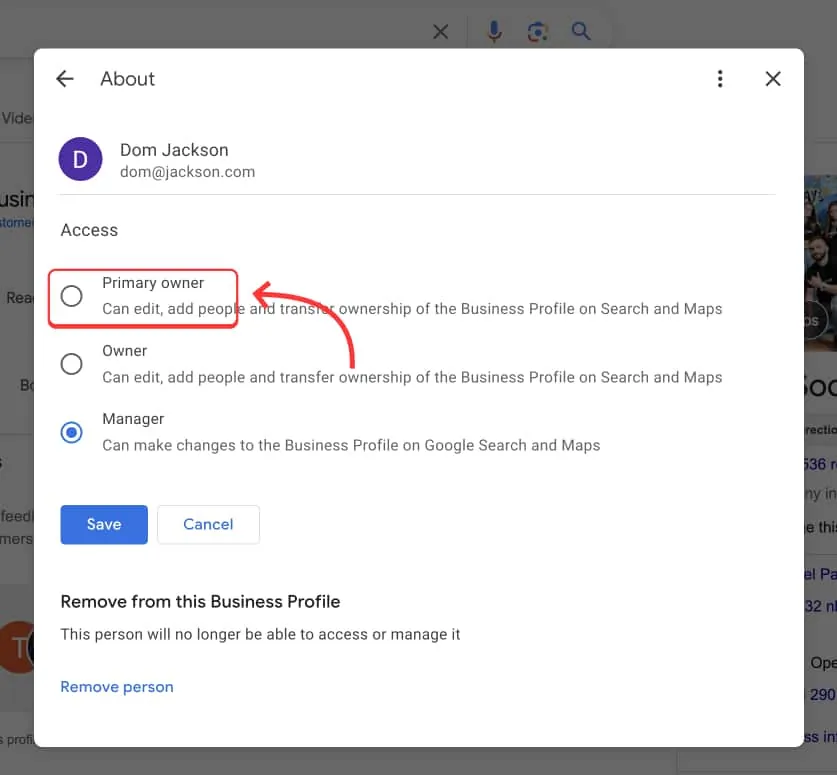
GBP currently has three main roles:
Primary owner main)
Originality: add/delete Owner and Manager, transfer ownership.
Default should be company email domain (Example: [email protected]).
Should enable 2FA (2-step authentication) & email/phone number recovery.
Owner
Has most of the same rights as Primary owner except transfer of ownership and delete Primary owner.
Used for: senior managers, head of marketing.
Manager
Manage daily content: Posts, photos/videos, reply to reviews/Q&A, update opening hours, products/services.
Cannot add/delete Owner, cannot transfer ownership
Suggested safe allocation (minimalist model):
Primary owner: 1 corporate domain account + 2FA.
Owner: 1–2 senior internal managers.
Manager: operations team, agency, freelancer (if any).
2) SOP for adding/removing members (standard & safe)
2.1. Add members
Step 1: Primary owner/Owner go to Business Profile Manager → select location → Settings → Managers.
Step 2: Add email → select role (Owner/Manager).
Step 3: Attach role SOP (section 2.3) + NDA (if external partner).
Step 4: Grant relevant permissions synchronously:
GA4 (Viewer/Analyst) to view KPI from GBP (via UTM).
Google Tag Manager (if any) to attach tracking call/chat.
Drive/Notion photo gallery & brand guidelines.
Posting schedule 90-day Google Posts & review/Q&A sample answers.
2.2. Remove/remove members
Step 1: Go to Managers → Remove email.
Step 2: Revoke related permissions (GA4, GTM, Drive, CMS, CRM, inbox).
Step 3: Update change log (entry 4).
Step 4: Review Security checklist: turn on 2FA, reset recovery, check for strange emails with Owner rights.
2.3. Safety convention when decentralizing authority (required notice)
Do not change Business name, address, main category, website URL without email approval.
Do not turn on/off Service Area/Storefront arbitrarily.
Only publish sensitive information (prices, big promotions, policies) after censorship.
Always attach UTM according to standards (refer to tracking section in Tracking UTM/KPI).
Photos/videos do not reveal sensitive information (license plates, customer records, internal information).
Negative review/Q&A: according to the agreed feedback framework; Do not delete "indiscriminately" (only if violating policy).
3) Transfer of ownership & common risks
3.1. When is it necessary to transfer rights?
Business changes owner/legal entity.
Terminate agency contract with Owner or Primary owner rights.
Standardize: transfer Primary owner from personal email → public domain email ty.
3.2. Ownership transfer process (safe)
Step 1: Make sure the current Primary owner is active, turn on 2FA.
Step 2: Add receiving account (company domain email) as Owner first.
Step 3: After at least 7 days (recommended), Transfer primary ownership → select the email to transfer.
Step 4: After the transfer is complete, demote the old account to Owner/Manager or Remove (according to the situation).
Step 5: Update change log + save receipt email.
Note: In In some cases, Google may apply a waiting period to the new owner before making certain sensitive changes. Please transfer permissions before when major edits are needed to avoid "stuck" progress.
3.3. Risks & ways to avoid
Risk 1 – Loss of Primary owner rights:
Prevention: Primary owner always belongs to the corporate domain + 2FA + recovery.
Option B: Have at least 01 internal Owner as a “backup”.
Risks 2 – Agency retains Owner rights after contract termination:
Prevention: Contract terms require handover of rights within X days; SOP handover at the end of the lesson.
Handling: Primary owner remove; If there is a "dispute", prepare legal & business records to request Google support.
Risk 3 - Sensitive editing leads to suspension:
Prevention: Follow the approval process + evidence (photo of sign, license, invoice, walk-through video).
Handle: Follow recovery instructions in Google Business locked (Suspension): see Suspension/Recovery.
4) Change log — admin like production operations
Maintain a simple change log (Google Sheet/Notion) to record:
Date – Time – Person – Role game
Item (NAP, category, website URL, services/products, opening hours, photos/videos, review replies, Q&A)
Change description (+ document link if any)
Status (approved/under review Google)
used.Support audit when changing agencies or changing personnel.
5) Handover checklist when changing agencies / changing internal teams
Before handover (prepared by the old party):
☐ List of locations (if multi-location), profile link.
☐ Existing roles & emails (Primary owner/Owner/Manager).
☐ Brand guideline document, photo/video gallery (Google Drive/Notion).
☐ 90-day Google Posts posting schedule + sample caption.
☐ Review/Q&A response process (answer form by level).
☐ All UTM is being used for Website, Book, Call (specify the convention).
☐ Sensitive change convention (name/address/category/website).
☐ Change log for the last 6–12 months.
☐ Related rights: GA4 (property/view), GTM, Search Console, CMS (if there is local landing).
When handing over (bilateral):
- needed).
☐ Check 2FA & recovery of Primary owner.
☐ Test functionality: post test posts, upload photos, respond to reviews/Q&A.
☐ Sign handover minutes (contents listed).
After handover (7–14 days):
☐ Follow up Performance: display, calls, directions, website visits.
☐ Review NAP data/category/opening hours.
☐ Check the destination URL has standard UTM (refer to Tracking UTM/KPI).
☐ Check for images/Posts that are not of the right brand → correct it.
6) SOP for updating sensitive information (anti-suspension)
“sensitive” items that can trigger censorship/temporary blocking:
Business name (add local/commercial keywords indiscriminately).
Address (change district/hide/show Service Area indiscriminately).
Main categories (Primary category).
Website URL (new domain transfer).
Phone number (tracking inconsistent).
Safety process:
Change request → description of purpose + photos/evidence (signs, premises lease contract, Business license, electricity/water bill, daytime/nighttime facade photos).
Internal approval (email or ticket).
Execution by designated Owner/Manager.
Monitor approval status (pending/approved) + Performance after 7–14 days of change.
If suspended, activate the appeal process according to the instructions in Suspension/Recovery (full set of documents + walk-through video).
7) Synchronize measurement: UTM – GA4 – KPI
To know how many calls/directions/website each change/campaign (Posts, photos, Q&A, Offer) brings visits/booking, please standardize tracking:
Sample UTM for Website/Booking/Deal button:
?utm_source=google&utm_medium=organic&utm_campaign=gbp_profile&utm_content=[post|offer|qa|branch]GA4: create Exploration see behavior from source “google / organic” +
utm_campaign=gbp_*.Core KPI: display Maps, calls, directions, CTR post, new review/week, average score, sessions/conversions from GBP.
If there is no measurement framework, see detailed instructions in Tracking UTM/KPI for Google Business.
8) Multi-location (multiple branches) — admin suggestion
Standardize naming convention (Brand + Region/District).
Use store code consistently (CN01, CN02…).
Bulk upload/verify for quick creation/synchronization.
The UTM standard has branch parameters in
utm_content.Dashboard GA4 by location to compare calls/directions/CTR posts.
(Read more in-depth multi-location instructions in the article “Multi-location Google Business: Bulk upload, UTM standard & GA4 dashboard by location” when published).
9) Frequently Asked Questions (FAQ)
1) Should the agency be Owner?
Only if they need to make structural changes or handle complex problems. The default Manager is enough. The primary owner always belongs to the business.
2) How often should the Primary owner be transferred from personal email to corporate domain email?
As soon as possible. This is an important security step to avoid being "stuck" when employees leave.
3) Does changing name/address reduce visibility?
Possible. Google often reviews harshly. Please prepare sufficient evidence and follow the "sensitive" SOP.
4) I can no longer contact the old agency, how can I revoke the rights?
If there is still a Primary owner, remove them. If there is a dispute, prepare legal documents to work with Google.
5) Is changing multiple photos/Posts at once considered unusual?
No, if the content is real and relevant. However, don't change NAP/category all at once when it's not necessary.
Google Business administration is not just "posting articles & responding to reviews"; that is a digital asset operation process that needs strict decentralization, transparent measurement, and safe SOP changes.
Set up:
Primary owner under business domain + 2FA.
Appropriate Owner/Manager permission model.
SOP add/remove to staff, sensitive updates, change logs.
Handover Checklist when changing agencies.
UTM – GA4 – KPI standard so that every action can be measured.
Need a set of “plug and play” SOPs (email invitation template, handover template, change log, anti-suspension process, UTM framework + dashboard GA4)? Tan Phat Digital team can hand over the complete set and provide instructions for quick deployment, ensuring safety & measurement.
Map Pack platform: Playbook 14 Days
Standard measurement: Tracking UTM/KPI
Handling of suspended records: Suspension/Restore
Share