Why does multi-location need to be “standardized” right from day 1?
If you operate a chain of 5–500 branches, three recurring problems are:
Fast & consistent management: Mass add/edit, no wrong NAP, no deviation of categories/opening hours.
Measurement by location: differentiate traffic, orders, leads come from which branch right in GA4/Looker Studio.
Optimize Map Pack by region: appears when users search for "[service] near me / District (scalable):
Naming & Store code (naming convention - branch code)
Bulk upload / Bulk verify (bulk add - edit - verify in bulk)
UTM standard by branch (website link, post, product/service service)
Dashboard GA4 by location (analysis and reporting)
KPI & maintenance schedule (sustainable operation)
If you are new to Local SEO, see the “big picture” first at:
Playbook 14 days to Map Pack (HCM) → https://tanphatdigital.com/vi/blog/google-business-hcm-playbook-14-ngay-vao-map-pack-checklist
Local SEO 2025 → https://tanphatdigital.com/vi/blog/2025-seo-dia-phuong-lam-the-nao-de-toi-uu-website-cho-tim-kiem-dia-phuong-chien-luoc-danh-rieng-cho-doanh-nghiep-nho
Get to the Top of Google Maps? → https://tanphatdigital.com/vi/blog/lam-the-nao-de-doanh-nghiep-nho-len-top-google-maps1) Naming & Store code: management, tracking and anti-duplication platform
1.1. Business name convention – follows policy
Legal/signal correct, no keyword stuffing.
Do not add county/city in Business name. Local signals are in description, services, posts, website.
Standard example:
“Minh An Pharmacy” (not “Cheap Minh An Pharmacy District 1”)
1.2. Store code (branch code) – required when multi-location
Unique, stable, short (≤ 12 characters), no duplicates.
Suggested rule: 3–5 characters brand + “-” + district/area + number.
For example:
TPD-Q1-01,TPD-QPB-02,TPD-TD-01.
Functions of store code:
Identification key to bulk upload/merge without errors.
Used as utm_content to count traffic by branch in GA4.
Used as label in GBP for quick filtering (internal).
1.3. Labels and Category Map
Create internal label (for example:
mien-nam,HCM,spa,clinic) for filtering & batch manipulation.Standardize Primary/Secondary category according to each vertical to avoid discrepancies (some location was selected incorrectly).
2) Bulk upload / Bulk verify: add - edit - batch verify
2.1. CSV/XLSX standard – columns should have
Store code (required – unique)
Business name
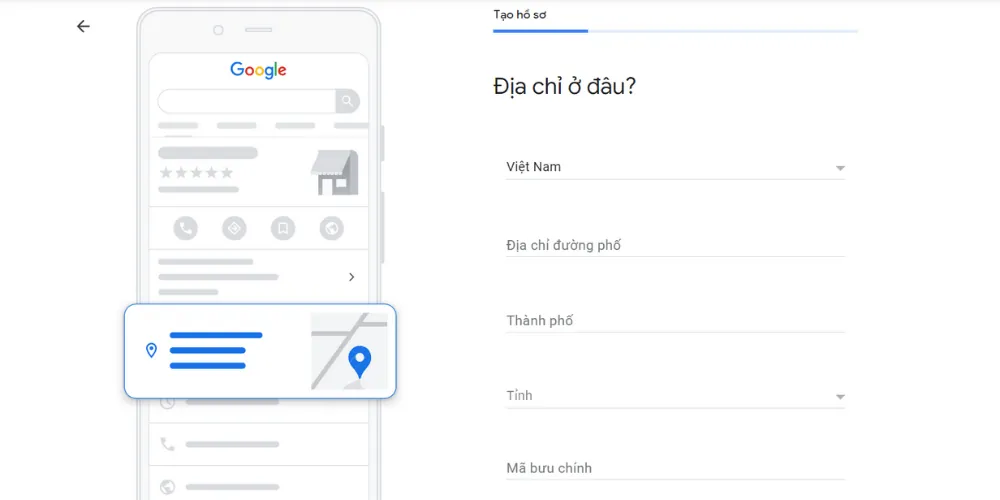
Address line 1, Address line 2, District/Sub-locality, City, Postal code, Country
Primary phone, Additional phone
Website (UTM inserted – see part 3)
Primary category, Additional categories
Opening hours (Mon–Sun; special hours)
Attributes (Wheelchair accessible, Parking, Language, Payment…)
Labels (internal:
HCM,mien-nam…)Service areas (if SAB – hide address)
Photos URLs (optional)
Tip: standardize addresses in a single format to avoid duplicate/hard-merge. For example: “10 Le Loi Street, Ben Nghe Ward, District 1, Ho Chi Minh City, 700000, VN”.
2.2. Add and update in bulk
Go to Business Profile Manager → Manage locations → Add business → Import businesses.
Download template, fill in all columns, import; Google will report an error which row - which column if the structure is wrong.
Bulk editing (opening hours, website, category) → Export, edit CSV → Re-upload.
2.3. Bulk verification (≥10 locations)
If eligible, you can apply for Bulk verification: prepare branch list, legal documents, proof of operation (front photo/signboard/opening hours).
Maintain real photos of each branch (front, space, team). Stock photos can easily lead to reviews that reduce trust or trigger re-verification.
2.4. SAB vs Storefront (avoid posting resume)
Storefront: has reception point; show address + hours.
SAB (Service Area Business): hide address, declare Service areas ≤ 20 reasonable areas.
Choosing the wrong model is easy to suspension and must appeal (see how to handle suspension: https://tanphatdigital.com/vi/blog/google-business-suspension-khoi-phuc-nhanh-checklist if you need).
3) UTM standard by branch: standard measurement right from GBP
Goal: all clicks from GBP to the website will carry branch traces for GA4 to identify sessions/orders/leads according to location.
3.1. UTM convention is simple - easy to read - easy to filter
utm_source=googleutm_medium=organicutm_campaign=gbputm_content={STORE_CODE}⟵ detail code branchutm_term={CLICK_TYPE}⟵website|post|product|service|menu|appointment|order|offers|events
Example URL standard:
https://tanphatdigital.com/chi-nhanh/quan-1?utm_source=google&utm_medium=organic&utm_campaign=gbp&utm_content=TPD-Q1-01&utm_term=websiteWhy use
utm_contentfor store code?GA4 already exists place for
utm_term(manual term), which you can use to record click type;utm_contentuses stable for store code.Later report by location = split by
utm_content.
3.2. Where to attach UTM in GBP?
Website (main link) → use standard UTM.
Appointment / Order / Menu (if industry has one) → UTM with
utm_term=appointment|order|menu.Products / Services → Deep link to the landing page of the service/product at the branch, still carrying UTM.
Google Posts → each post inserts a different UTM link
utm_term=postto measure post CTR by location.
Refer to how to set UTM and overall playbook in the 14-day Playbook (HCM):
https://tanphatdigital.com/vi/blog/google-business-hcm-playbook-14-day-on-map-pack-checklist3.3. Landing convention by branch (website URL)
1 Local Landing for each branch (with NAP, embedded map, real image, LocalBusiness schema).
Suggestive URL structure idea:
/chi-nhanh/quan-1/chi-nhanh/thu-duc/chi-nhanh/quan-3
Local Landing needs to optimize standard On-page (schema, headings, local FAQ) - see:
Google Standard On-page SEO Guide 2025 → https://tanphatdigital.com/vi/blog/huong-dan-seo-onpage-chuan-google-2025
Google Maps & Business Schema integration → https://tanphatdigital.com/vi/blog/tich-hop-google-maps-business-schema-or-tang-hien-thi-website-15
4) Dashboard GA4 by location: from UTM to management reports treatment
4.1. Create custom Dimension (if needed)
Default GA4 captured campaign/source/medium/term/content. You can:
Go to Admin → Custom definitions → Create custom dimension
Name:
Store codeScope: Session
Event parameter:
utm_content(GA4 automatically maps from the link UTM)
Similarly, you can create Click type from
utm_term(Session scope) to decompose click type.
If you use GTM for website events (like click_to_call, click_directions, form_submit), remember to attach the store code by reading the UTM from the URL and save to sessionStorage then attach to each event (event parameter
store_code). Helps you break down conversion by branch right on the website.4.2. Quick report in GA4 (Exploration)
Free form:
Filters:
Session source = google,Session medium = organic,Session campaign = gbpRows:
Session manual ad content(ieutm_content= store code)Columns:
Event nameorDefault channel groupValues:
Sessions,Engaged sessions,Conversions(or target event),Total revenue(if e-commerce element)
Funnel: find out by store code performance from landing → product view → add_to_cart → purchase.
4.3. Looker Studio: admin panel for CMO/OM
Data sources: GA4 + GBP Performance export (weekly CSV export: show, call, directions, site view, top query).
Blend:
store_codefrom GA4 (utm_content) +store_codehand-mounted in GBP CSV (please add This column when exporting is for convenience).Card/KPI should have:
Sessions / Conversions / Revenue by
store_codeCTR Post by location (
utm_term=post)Rate of “call / directions” from GBP (source GBP) + “click_to_call / directions” from website (source GA4)
Top queries GBP by location (CSV GBP)
4.4. Track post/service/product performance by location
Filter
utm_term=postto see which posts pull traffic.Filter
utm_term=service|productto see which service/product gets the most clicks by store code.A/B photo & post caption (real photos of the store – team – before/after) | update Services according to each region's needs.
5) KPI & maintenance schedule (multi-location cadence)
5.1. Chained KPIs (system-wide)
Shows (Search/Maps) and actions (calls/directions/texts) from GBP.
Sessions / Conversions / Revenue from GA4 filter
utm_campaign=gbp.Conversion rate change by
store_code.CTR Post (taken from UTM
utm_term=post) by location.New review/week & average score, response rate.
NAP consistency score (self-scoring: % of locations fully synchronized with NAP, opening hours, category).
5.2. KPI by branch (store level)
Sessions, Leads/Revenue from
utm_content={store_code}.Call/Directions/Website views from GBP Performance.
Post→session (click-through) rate this week vs last week.
Update rate/photo freshness (photos/week).
Review response rate < 24 hours.
5.3. Maintenance schedule
Weekly:
2–3 Google Posts/store (local deals – reasons for choosing – directions/parking).
3–5 new reviews/store; 100% response review within 24–48 hours.
2–3 real photos/store (dark front facade, day activity, real case).
Check Insights/Performance → adjust post/service keywords.
Goods month:
Audit NAP & opening hours entire chain.
Audit category (new industry/new products?)
Audit Local Landing (schema, local FAQ, new photos).
GA4 report/Looker Studio by store code for the executive board.
Sample process deployed in 14 days (multi-location)
D1–D2: Standard Store code, Naming, Label; Create Category Map by industry.
D3–D5: CSV standard; bulk import; structural error correction; mapping SAB/Storefront.
D6–D7: Complete Local Landing for each branch (schema, map, real photos); attach standard UTM.
D8–D9: Please bulk verify (if eligible) / verify each location; add photos/videos.
D10–D11: Enable Posts/Products/Services (UTM deep links); set appointment/menu/order if available.
D12: Mount dashboard GA4 (dimensions UTM); Build Looker Studio.
D13: Script for review by branch; sample response; Useful Q&A.
D14: Review KPI; Hand over weekly/monthly operational checklist.
Common mistakes & how to avoid (multi-location)
Do not use store code → difficult to bulk, difficult to measure → must use from the beginning.
Business name keyword stuffed by district → policy violation, easy to report/suspension.
Website link does not have UTM → lost session tracking by branch in GA4.
Wrong address/model (SAB vs Storefront) → easy to suspend records; Please choose the right model.
Stock photos / lack of real photos → reduces trust & engagement.
Local Landing “shared” for many branches → difficult to rank & difficult to convert → 1 page per branch.
Not responding to reviews → reduces highlights; set a response SLA.
Mini-checklist (print out for the team)
☐ Unique Store code (attached to
utm_content)☐ CSV bulk standard columns (NAP, category, hours, website UTM, labels)
☐ SAB/Storefront correct model
☐ Local Landing each branch (schema, map, real photos, local FAQ)
☐ UTM:
utm_source=google,utm_medium=organic,utm_campaign=gbp,utm_content=STORE_CODE,utm_term=CLICK_TYPE☐ Posts/Products/Services deep link with UTM
☐ GA4 receives
utm_content(Store code) + web events (call/directions/form)☐ Looker Studio: GA4 + GBP Performance (CSV)
☐ Review script + 24–48h feedback
☐ Weekly/monthly maintenance by cadence
FAQ – Frequently Asked Questions
1) Can a chain of ≥10 locations be bulk verified?
Yes, if the records and documents meet; Google may request proof of operation for each location (real photos, invoices, licenses).2) Is SAB at a disadvantage over Storefront?
No if you hide the address properly and optimize Service Areas properly. However, Storefront's Distance often has an advantage in close queries.3) Can one common landing page be used for many branches?
Should not. 1 Local Landing for each branch for better ranking & conversion, easy to attach separate UTM & schema.4) How to measure "call" and "direction" of GBP in GA4?
These two actions happen on GBP. You pull from GBP Performance (CSV/API) and blend with GA4 in Looker Studio. On the website, you still measure click-to-call and click directions for your own site.5) Should you insert a district into the Business name to quickly load the Map Pack?
No. Violation; suspension risk. Please include local signals in description, services, posts, website.Multi-branch Google Business administration is not difficult, if from the beginning you discipline: store code – standard bulk – clean UTM – GA4 dashboard by location – operational cadence. Done right, you'll know which affiliates win, which posts pull traffic, which services should be pushed by region, and measurably improve the Map Pack.
Need a set of templates (bulk CSV, UTM conventions, Looker Studio dashboard, review script, maintenance SOP) that applies right to your chain? Tan Phat Digital is ready to accompany.
Share