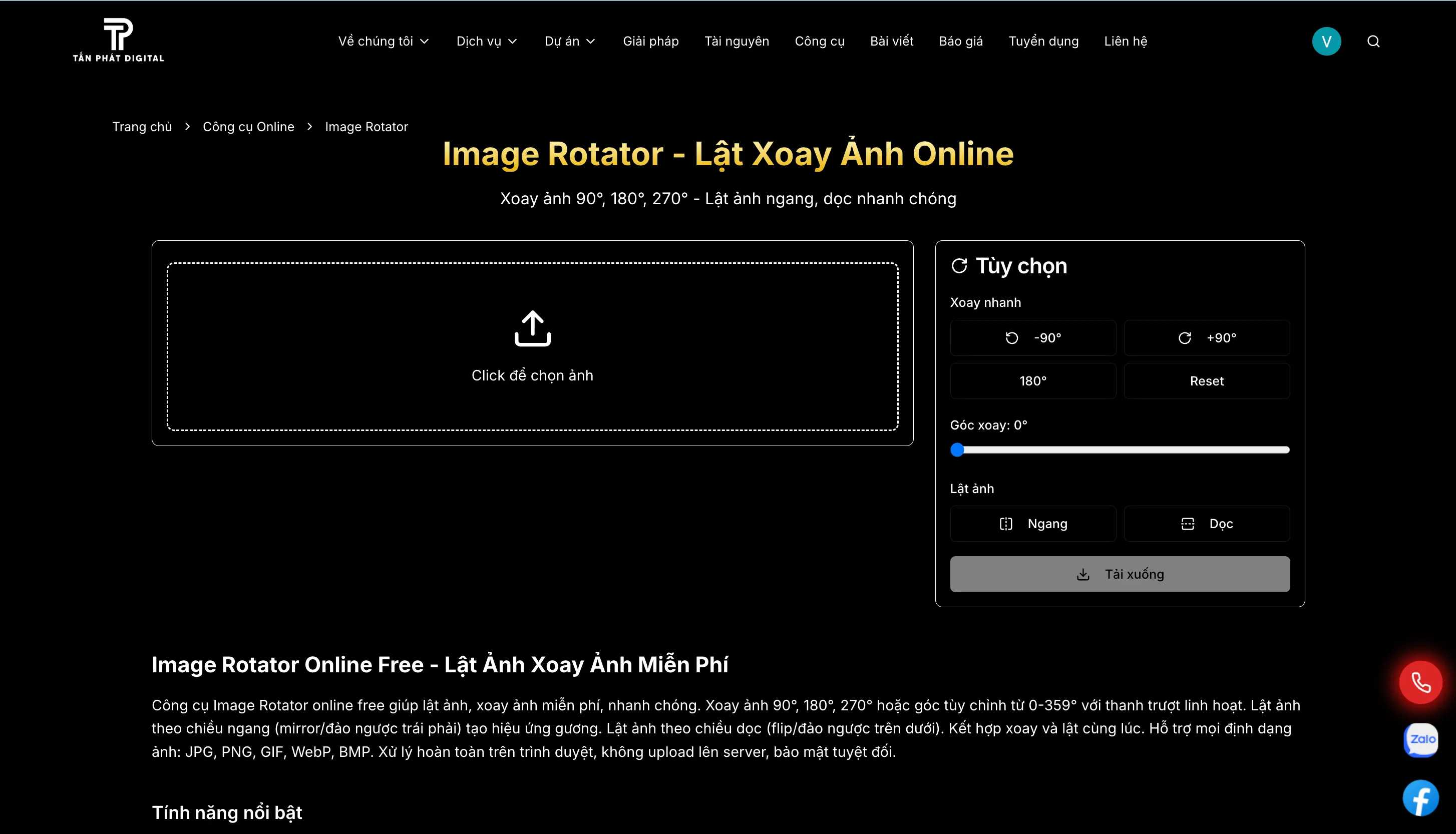
During the third half-decade of the 21st century, Vietnam has affirmed its position as one of the most dynamic digital economies in Southeast Asia. By 2026, the digital market has completely shifted to a visual-based economy. The deep integration of artificial intelligence (AI) into the entire advertising and marketing process has reshaped the way businesses interact with online content.1 In this context, image processing tools like Image Rotator (Online image rotation) are no longer a simple auxiliary utility, but become an essential link to ensure the consistency of image data flow in the social commerce ecosystem.2
The emergence of Image Rotator Online tool Free at Tan Phat Digital's system is a direct response to this need, focusing on solving specific problems: image orientation errors due to EXIF metadata, the need to create mirror effects for selfie photos, and standardizing product images according to the strict standards of e-commerce platforms in 2026.3
1. Technical Analysis: Image Processing Mechanics and Metadata Solutions
Geometric and Mathematical Transformations
Flipping and rotating images are essentially basic geometric transformations in two-dimensional space. However, implementing them smoothly in the browser requires precise calculation of the pixel data structure. When the user executes the command to rotate any angle $\theta$ (from 0 to 359 degrees), the system must recalculate the coordinates for each pixel based on the rotation matrix.4
In two-dimensional space, if a pixel has coordinates $(x, y)$, after performing rotation around the center $(0,0)$ with angle $\theta$, the new coordinates $(x', y')$ are calculated according to the formula formula:
$$x' = x \cos \theta - y \sin \theta$$
$$y' = x \sin \theta + y \cos \theta$$
For special rotations such as 90°, 180°, or 270°, calculation of image width and height swaps is performed instantly via the Canvas API, allowing real-time viewing of results (realtime preview) before exporting the file.5
Completely solve the EXIF Orientation error
One of the main reasons users turn to Tan Phat Digital's tool is the phenomenon of photos taken from phones (especially iPhones and high-end Android lines) being displayed in the wrong direction when uploaded to the web.7 This phenomenon originates from EXIF (Exchangeable Image File Format) metadata. The camera usually does not rotate the actual pixel but only records a tag called "Orientation" to indicate the display direction. 7
Common EXIF Orientation value table:
Value 1 (Normal): The image is displayed in the correct default orientation.
Value 3 (Rotate 180): The image is displayed upside down
Value 6 (Rotate 90 CW): Image is horizontal (rotate right 90 degrees).
Value 8 (Rotate 270 CW): Image is horizontal (rotate left 90 degrees).
Values 2, 4, 5, 7: Included flipped versions of the image. rotated (Mirrored).
The problem arises when many browsers or social networking platforms automatically strip metadata to reduce capacity, causing the image to lose orientation information and return to an inverted state.10 Tan Phat Digital's Image Rotator tool solves the problem by "baking" the image directly into the physical pixel array and removing the old Orientation tag, ensuring the image displays correctly on all devices.7
2. Security and speed advantages through Client-Side processing mechanism
Unlike traditional tools that require uploading photos to the server, Image Rotator operates entirely on the user's browser (Client-side).11
Outstanding advantages of browser processing:
Absolute Security (Zero Data Exposure): Sensitive images never leave your device you. This is especially important when the Personal Data Protection Law 2025 takes effect from early 2026.
Instant processing speed: Completely eliminates internet network latency (Upload -> Processing -> Download). Image rotation of 50-100 files takes place in just 3-5 seconds by taking advantage of local GPU hardware.13
Offline Capability: Once the web page has loaded, you can rotate images even without an internet connection.13
Lossless processing: Use
OffscreenCanvasto ensure pixels are not compressed or lose detail during the conversion process.13
3. Psychology and Practical Applications in 2026
Mirror Effect for Selfie Photos
The need to flip the image horizontally (horizontal flip) is deeply psychological. People are accustomed to seeing their reflection in mirrors every day (Mere-exposure effect).14 The default camera lens often records images from the observer's perspective, making the subject feel that their face is "strange" or asymmetrical.16 Flipping mirror images helps users feel more confident and positive about their appearance.14
Standardize images for e-commerce platforms (Shopee, TikTok Shop)
By 2026, e-commerce platforms have applied AI to scan and lower display scores for product images that do not comply with standards.2
E-commerce platform image standards 2026:
Product main photo: Must display the front view clearly. If the photo is skewed, the seller is required to rotate it to the correct vertical axis.19
Diverse shooting angles: A minimum of 5-9 photos covering all angles is recommended. The image flipping feature helps create symmetrical views from a single original file, making the store look uniform and professional.21
Size and format: 1:1 square ratio (900x900px or 1200x1200px) is the gold standard. Rotating the image through the Tan Phat Digital tool helps ensure the aspect ratio is not distorted.
4. Compare positions: Tan Phat Digital vs. Canva & Photoshop
For objective evaluation, it is necessary to place Tan Phat Digital's tools next to other popular solutions:
In terms of complexity and speed:
Image Rotator (Tan Phat Digital): No account required, 1-click processing, 100% free, instant speed.13
Canva: Delivery The drag and drop interface is easy to use for beginners, but the process of creating a project -> upload -> rotate -> download takes many intermediate steps and requires registration.23
Adobe Photoshop: Provides absolute pixel control (Unsharp Mask, High Pass) but is extremely complicated, requires heavy software installation and high licensing costs.25
About features niche:
Odd angle rotation: Tan Phat Digital supports sliders from 0-359 degrees with high precision, extremely useful for straightening scanned documents that are tilted 1-2 degrees.4
Mirror flip: Horizontal flip (Mirror) and vertical flip (Flip) modes are designed separately, instead of having to manually rotate 180 degrees as effective as some other tools.24
5. Instructions for maximizing the power of Image Rotator
The operating process is optimized by Tan Phat Digital for non-professional users:
Receive: Drag and drop images directly into the browser (Drag-and-drop).
Quick rotation: Use buttons -90°, +90°, 180° for common image direction errors
Fine rotation: Drag the slider to adjust odd tilt angles (suitable for architectural photos or scanned documents).
Flip photo: Select "Horizontal" to create a selfie mirror effect or "Vertical" to fix an upside-down photo.
Download: Click the "Download" button to get a quality PNG file high, keeping the original resolution for printing or SEO purposes.28
2026 Vision: AI and Online Image Processing Ecosystem
In the near future (2026-2027), Tan Phat Digital aims to integrate WebGPU and WebAssembly into the toolkit to improve processing performance to professional software levels right on the web.13 Features such as automatically detecting footprints Auto-Leveling using AI will soon be launched to provide maximum support for digital content creators.
In a world flooded with image content, having a smart, fast and secure image orientation adjustment tool like Tan Phat Digital's Image Rotator is a boon. competitive advantage cannot be denied. With the commitment "Today's web SEO is about generating leads", Tan Phat Digital will continue to accompany the Vietnamese business community in optimizing all visual experiences in cyberspace.
Experience now at: https://tanphatdigital.com/vi/tools/image-rotator
Share