Why is XML sitemap important in SEO?
In the journey to bring your website to the top of Google, XML sitemap (XML sitemap) is an indispensable part and plays an extremely important role. Think of it as a detailed "map", helping search engines like Google understand the structure, important pages and navigation on your website quickly, accurately and completely.
Creating an XML sitemap and submitting it to Google Search Console brings many practical benefits, helping you improve your SEO performance clearly:
Google understands the website structure: Sitemap provides an overview about all important pages, helping Googlebot easily discover and index content.
Increase the ability to index new content: Especially useful for websites with many pages, or regularly updated with new content such as blogs, news pages, new products. Sitemap helps Google recognize and index more quickly.
Detect crawl errors: Google Search Console will report if any errors occur during the process of Googlebot accessing and indexing URLs in your sitemap.
In today's article, Tan Phat Digital will show you how to create an XML sitemap and submit it to Google Search Console simply in a few simple steps, even if you're not very technical. We are a professional Ho Chi Minh Website Design unit, always putting SEO factors first.
What is XML Sitemap? How does it affect SEO?
To better understand how to create and submit a sitemap, we need to master the concept and its benefits in SEO.
📌 What is an XML sitemap?
An XML sitemap is a file (file) formatted according to XML standards, containing a list of all important URLs (paths) on your website that you want Google and other search engines to know about. These URLs can include your homepage, blog posts, product pages, service pages, contact pages, etc. Its main purpose is to "direct" search engine bots.
🧠 Benefits of XML Sitemaps in SEO:
Helps Google Bots easily discover and index entire website content: Although Googlebot can find pages on its own by following links on your website, sitemaps provide a clear roadmap, ensuring they don't miss any important pages any pages, especially pages deep in the website structure or without many internal links pointing to them.
Useful for large websites, many pages, or with regularly updated content:For websites with hundreds or thousands of pages or e-commerce websites with constantly changing products, sitemap is an indispensable tool for Google to quickly update information.
Reduce index wait time new article: When you publish a new article or product, updating the sitemap and submitting it to Google Search Console signals to Google that there is new content that needs to be indexed, helping your article appear in search results faster.
Detecting indexing issues: Google Search Console uses sitemaps to provide information about indexed URLs and potential errors (e.g. page is blocked, not found).
🎯 When do you need a sitemap?
Website has just launched: This is when the sitemap is most effective, helping Google quickly recognize and index your entire new website.
Websites with regular dynamic content: Blogs, news sites, e-commerce websites are examples Typical example.
You want to increase the indexing speed of SEO articles: When you have a strong content strategy, sitemap will help Google quickly bring your article to search.
💡 At Tan Phat Digital, when providing website design services at Tan Phat Digital, all websites are integrated with automatic sitemaps, structural standards and support for submission to Google. Search Console. We are a professional web design service in HCM that always ensures your website is fully optimized from A-Z.
Instructions for creating an XML sitemap
Creating an XML sitemap is not as difficult as you think, especially with the support of tools and plugins. Here are the popular ways:
✅ Method 1: Use a Plugin with WordPress (most popular and easiest)
If your website is built on the WordPress platform (the most popular platform today), creating an XML sitemap is extremely simple thanks to powerful SEO plugins.
Step 1: Install the Rank Math or Yoast plugin SEO:
Go to your WordPress admin panel.
Go to
Plugin>New Settings.Search for "Rank Math" or "Yoast SEO", install and activate the plugin. (Rank Math is often preferred because of its powerful features and friendly interface).
Step 2: Go to the plugin's SEO Settings:
After activation, you will see a new item in the left menu (usually "Rank Math" or "SEO"). Click on it.
Look for settings related to "Sitemap" or "XML Sitemap".
Step 3: Enable Sitemap functionality:
Make sure that sitemap generation functionality is enabled. These plugins often automatically create sitemaps after activation.
Step 4: Check the Sitemap path:
The default path of the sitemap is usually:
https://yourdomain.com/sitemap_index.xml(for Rank Math/Yoast SEO) orhttps://yourdomain.com/sitemap.xml. like Next.js, Laravel, you can create sitemaps with online tools:Use online tools like XML-Sitemaps.com:
Enter your website URL in the box and click "Start" (or "Generate Sitemap").
This tool will scan your website and create a sitemap.xml file.
Export the file .xml and upload to the website root directory:
After the tool has finished creating, download the
sitemap.xmlfile.Use an FTP client (for example, FileZilla) or your hosting's file manager to upload this
sitemap.xmlfile to the website's root directory (usuallypublic_htmlorhtdocs).
Sitemap path: After successful upload, your sitemap path will usually be:
https://yourdomain.com/sitemap.xml.
💡 For websites designed by Tan Phat Digital, the sitemap will be pre-configured, optimized for Google index automatically according to international SEO standards. You don't need to worry about this technical part. We ensure every website delivered is ready for Google to "read" and "understand".
How to submit an XML sitemap to Google Search Console
Once you have an XML sitemap file, the next step is to submit it to Google Search Console (GSC) to notify Google of the sitemap's existence and encourage them to index your pages.
📌 Step 1: Visit Google Search Console
- (property). Select "URL prefix" and enter your full website URL (for example:
https://yourdomain.com/), then follow the instructions to verify website ownership (usually by uploading an HTML file to hosting or adding a DNS record).
📌 Step 2: Select “Sitemaps”
After logging in and selecting the correct "property" (website) of You, look at the menu bar on the left, find and click on "Sitemaps".
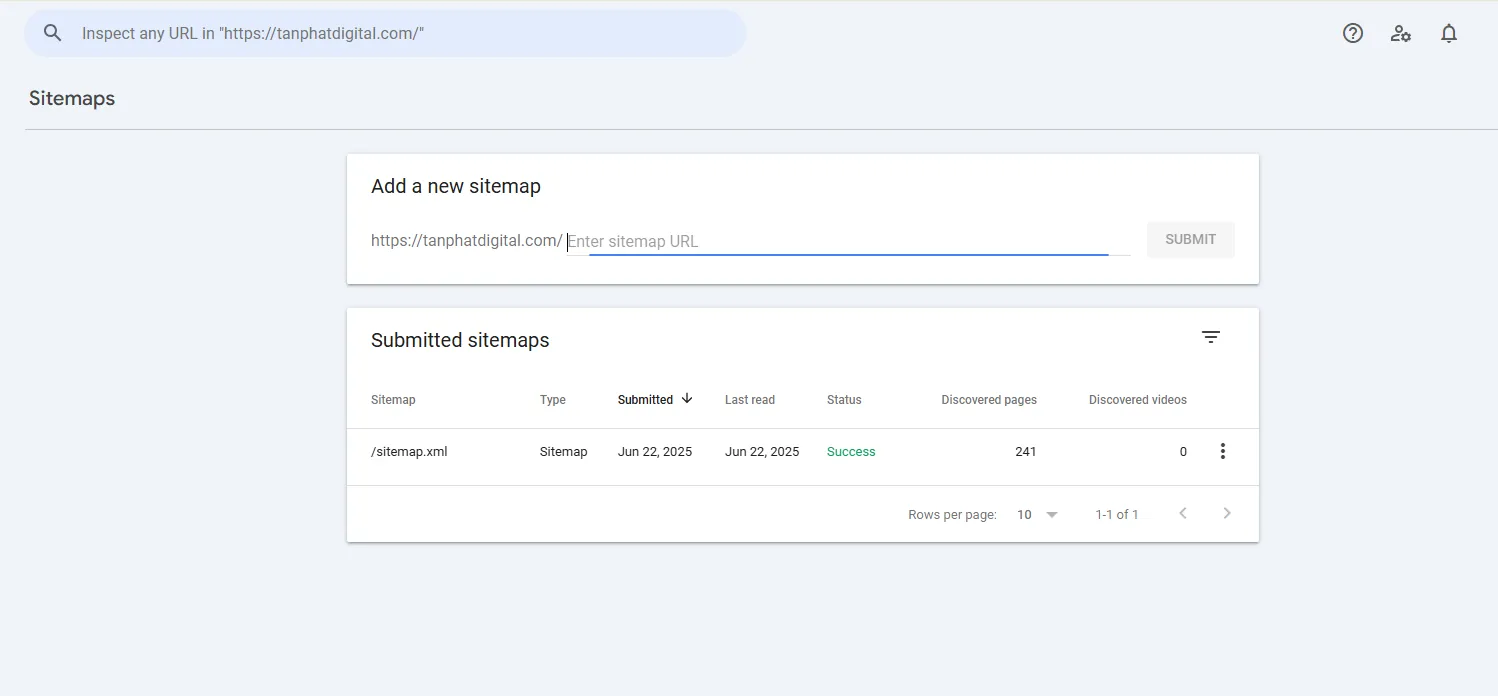
📌 Step 3: Enter the sitemap URL and click “Submit”
In the "Add a new sitemap" section, you just need to enter the URL extension of the sitemap.
Nếu bạn dùng plugin WordPress (Rank Math/Yoast SEO), bạn sẽ nhập:
/sitemap_index.xmlNếu bạn tạo thủ công hoặc website code tay, bạn sẽ nhập:
/sitemap.xml
Sau khi nhập xong, nhấn nút "Submit".
📌 Step 4: Check the status
After clicking "Submit", Google Search Console will start processing your sitemap.
Check the "Status" column. If "Success" or "Success" is displayed, it means your sitemap has been accepted by Google and is in the process of being processed.
You can track more detailed information about the indexing process in the "Coverage" section in Google Search Console. This section will tell you how many URLs have been indexed, and if there are any errors.
💡 Don't forget to update the sitemap after each important content added/removed on the website (eg: posting a new blog post, deleting a product page). Most WordPress plugins do this automatically, but if you do it manually, you'll need to regenerate and submit the sitemap again.
Common errors when submitting sitemaps and how to fix them
Even though submitting a sitemap is quite simple, sometimes you may encounter a few errors. Here are common errors and how to fix them:
❌ Sitemap contains 404 error or broken URL:
Cause: Your sitemap is listing URLs that do not exist, have been removed or have been redirected.
✅ How to fix: Recheck your sitemap structure. If you use WordPress, the plugin usually handles it automatically. If creating manually, use a URL checker like Screaming Frog SEO Spider or other online tools to find and remove broken URLs from the sitemap.
❌ Submitted in the wrong format (not .xml):
Cause: You submitted a file that is not XML, or the XML format is not suitable rules.
✅ How to fix: Check the file name (
sitemap.xmlorsitemap_index.xml), make sure it is a valid XML format and encoded with UTF-8. You can use the online sitemap checker tool to verify.
❌ Submitting the sitemap in the wrong location (not in the root domain):
Cause:Your sitemap.xml file was not uploaded to the root directory of the website, making it impossible for Google to find.
✅ How to fix it Recover: Make sure that the
sitemap.xmlfile is placed directly in the root directory of the main domain, for example:https://yourdomain.com/sitemap.xml.
💡 If you are using website design services at Tan Phat Digital, all of this technical part (including sitemap configuration and GSC integration) is installed automatically and optimally. Advantage - you don't need to touch a single line of code, we will make sure everything works smoothly.
You should choose a web design unit that supports SEO & Google Tools
A good website not only needs to have a beautiful interface but also has to have technical SEO standards from the beginning to ensure visibility and competitiveness on Google. Choosing a Ho Chi Minh website design unit with experience in SEO is extremely important.
Prioritize units that provide comprehensive services, including:
Design with integrated sitemap, Google Analytics and Google Search Console:Ensure the website is optimized right from the development stage so that Google can easily index it and you can track its effectiveness. productivity.
Friendly interface, fast loading, good security: These technical elements not only bring a good experience to users but are also highly appreciated by Google in rankings.
Experience in optimizing indexes and bringing websites to the top: The unit can advise on content strategy, keywords and other SEO techniques.
💡 Tan Phat Digital - Ho Chi Minh website design service - always accompanies customers in the entire SEO process, from:
Speed standard design: Ensure your website loads quickly on all devices.
Create sitemap and integrate Google Search Console: Accurate configuration for Google to easily read and understand website.
Instructions for writing SEO articles and increasing traffic from Google: We not only build websites but also equip you with knowledge to confidently develop content and attract potential customers.
With our high-quality cheap website making service, you will own a fully optimized website.
Sitemap XML is a solid SEO foundation
Working instructions for creating an XML sitemap and submitting it to Google Search Console are not difficult, but are an extremely important and necessary step for effective search engine optimization (SEO). XML Sitemap is a solid foundation that helps Google understand and index your content quickly and accurately.
If you are building a website or preparing to invest in building an online brand, don't skip this important step. It will help your website get off to a good start on Google and reach the right potential customers.
📌 If you want to own a website:
Automatically create sitemap and always update.
Integrated with Google Search Console and other Google tools.
SEO standards from the beginning, beautiful interface, fast page loading speed and High security.
Please contact Tan Phat Digital - a professional website design unit in Ho Chi Minh - we are proud to accompany more than 10 customers every month, helping them bring their websites to the top of Google.
Share