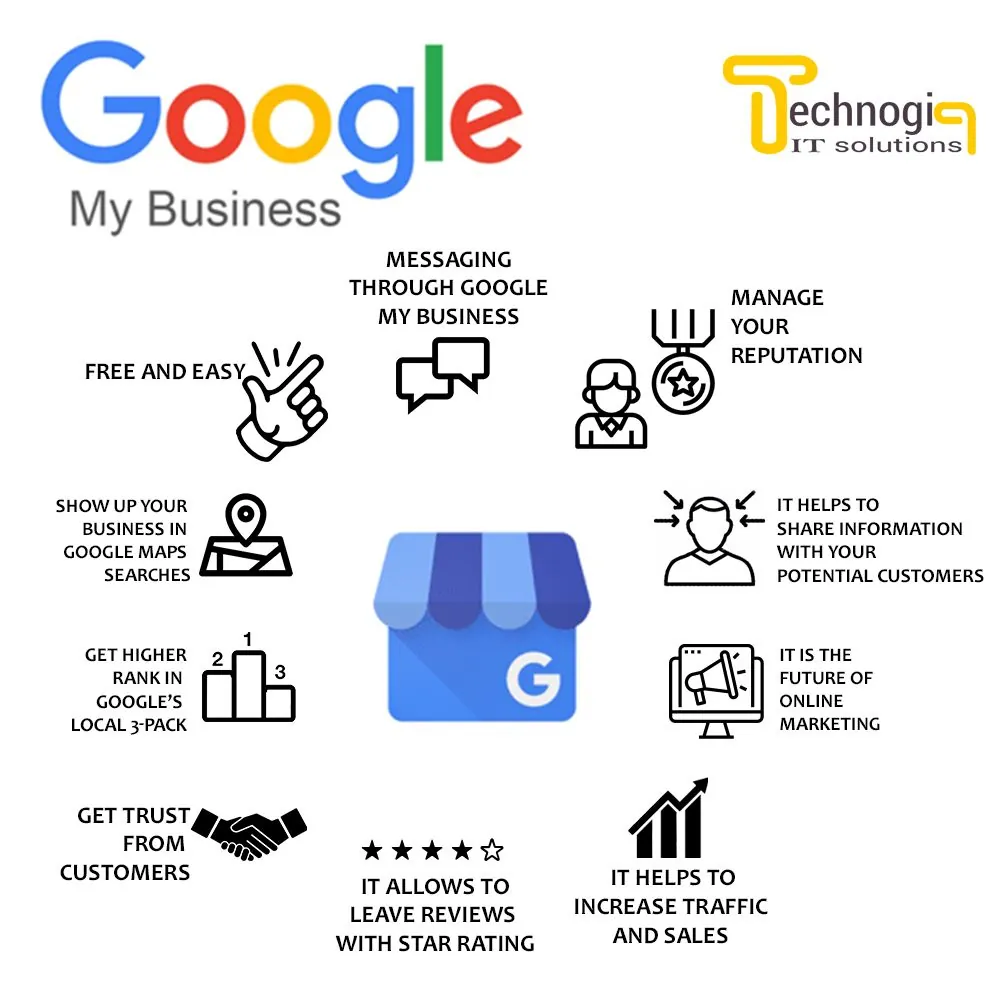
1) What is Google Business? Why is it important?
Google Business Profile (GBP) is the business profile that appears on Google Search and Google Maps. When users search for “service + near me / district “open today”, “in district 1/district 3…”
Increase on-site conversions: more calls, requests for directions than pure web results.
Sustainable costs: no pay per impression like Ads; keep optimal level position & maintain regularly.
If you are in Ho Chi Minh City and want to access Map Pack quickly, see 14-day Playbook (with checklist included): Google Business HCM: Playbook 14 Days to Map Pack.
2) How GBP ranks: Relevance – Distance – Prominence (R-D-P)
Relevance (Related): profile has match query intent? (category, attributes, content, services/products, Q&A, posts).
Distance: business location compared to searcher location.
Prominence: reputation/mentioned: reviews, real photos/videos, press/external links, active content.
You cannot “move the store” closer to where people are looking, but you maximize Relevance & Prominence and expand coverage with local content (HCM/district) to increase the rate of entering the Map Pack.
3) Prepare before configuration
Clear legal information/address: Business license, premises lease contract, electricity/water bill (used when verification is needed).
“Main” phone number: used consistently on website, GBP, contacts; If there is call tracking, put tracking in the “Additional” field.
Administrative email: use company domain email as Primary owner, turn on 2FA (avoid losing rights).
Real photo/video gallery: facade, space, team, process, products/services service.
4) Instructions for configuring standard GBP - step by step
Step 1: Create/claim & verify location
Find a business on Maps → “Claim this business” or create a new profile.
Select type:
Storefront (with frontage, reception at place).
Service Area Business – SAB (service only at home/guest location, hide address, set service area).
Verification: postcard, video, call – depending on industry/area. Prepare photos of signs, facades, reception counters.
Step 2: Standardize NAP & opening hours
Name – Address – Phone (NAP) 100% match between GBP – website – footer – schema – directory.
Enter opening hours (including holidays), website URL attaches standard UTM (for example:
?utm_source=google&utm_medium=organic&utm_campaign=gbp_profile).With SAB, hide the address, declare a reasonable service area (maximum 20 areas set weak).
If you want to measure the standard, see the guide UTM/KPI: Tracking UTM/KPI for Google Business.
Step 3: Choose a category
Primary category: closest to the search intent (eg: “Dental”, “Coffee shop”, “Correction of things”). tie”…).
2–4 Secondary categories related. Don't cram.
Wrong category = reduce "Related", difficult to enter Map Pack.
Step 4: Services/Products
Fill in services/products according to local context (eg: "Sofa cleaning in District 3", "Thao hair shampoo" Fill in”…).
Each item has short description + price (if available), illustration. Pin 3 best-selling services.
Step 5: Describe the business (750 characters)
Present USP + localization (HCMC/district), insert natural keywords.
Conclude with CTA: “Call now”, “Book Calendar", "Please give directions".
Do not spam keywords in "Business name"; All optimizations should be in the description, service, post.
Step 6: Photos & Videos
Post 10–15 real photos: facade (day/night), in store, team, process, before–after (if appropriate).
1 15–30s video: space scan, supply operations service.
Pay attention to lighting and layout; caption is rich in context. Google often drops EXIF; don't rely on "geotag hack".
Detailed instructions & shot list by industry: see Google Business Photos & Videos here: Photos & Videos: Formula to Increase Conversions.
Step 7: Messaging & Call history
Turn on Messaging for customers to message; compose auto-reply for 5–7 common questions.
Turn on Call history (if available) to count calls from GBP.
Step 8: Q&A (Q&A)
Seed real questions: rush hours, parking, bus/metro routes, support languages, booking process...
Answer short - clear - with CTA ("Texting to reserve a seat at 5pm - 7pm is quite crowded").
Detailed set of scripts by industry: see Q&A used to finalize appointments: Google Business Q&A - How to use to finalize appointments & filter customers.
Step 9: Review (type price)
Ask for a timely review (after the customer is satisfied): SMS/Zalo/QR/shortened link.
No "buying reviews", no "gating" (filtering to only send links to customers with 5 stars) - risk of suspension.
Answer all reviews, especially 1-star reviews according to the frame: acknowledge - apologize (if any) - solution - invite private dialogue.
Sample script for asking & responding, and how to "clear mines" of negative reviews: see Review Google Business: Process for asking - responding - handling bad reviews.
Step 10: Google Posts (posts)
Post 2–3 posts/week: Updates, Offers, Events.
Suggested content for HCM/district: “why choose us in [district]”, “domestic deal”, “directions/parking”.
Attach separate UTM to each post to measure CTR/conversions.
Get a 90-day idea calendar (by season & Ho Chi Minh City events): Google Posts – Internal Calendar 90 days.
Step 11: Local landing page on website
Create a landing page for HCMC/district:
Title/H1 has “HCMC/District X”.
NAP in footer, map embed, Local FAQ (parking, winter hours, quick delivery within the city...).
Internal links to main services and geo-topical blog posts.
Add LocalBusiness schema consistent with GBP.
2025 standard on-page configuration: see SEO Guide on-page here: On-page Google standards 2025.
Step 12: External links/local citations method
Create/synchronize NAP in quality directories (Foody, TripAdvisor, Coc Coc Map, local associations...).
Avoid "spreading" spam; Prioritize few but quality, consistently.
Step 13: Measure & improve
GBP Performance: display Maps/Search, top queries, calls, directions, website visits.
GA4: track traffic/conversions from GBP (thanks to UTM).
Adjust post topics, services/products, Q&A based on growth queries.
5) Short “plug and play” checklist
☐ standard NAP (GBP – website – schema – contacts)
☐ Primary & Secondary categories correct
☐ Services/Products according to HCM/district context
first, reply to all☐ Google Posts: 2–3/week, attach UTM
☐ Local landing page + schema + embedded map
☐ Citations local (8–10 entries target)
☐ Performance/GA4 weekly monitoring
6) Common mistakes (and how to avoid)
Stuffing keywords into “Business name” → Violation of policy, easy to be reported/locked. Set the correct legal name/sign; Optimize keywords in descriptions, services, posts.
Do not overlap phone numbers between GBP - website - contacts → Should fix 1 "Primary" number. Tracking number should be in “Additional”.
Choose the wrong category or lack Services → Carefully review Primary, add services according to local context.
Stock photos, old blurry photos → Real, new, bright, clear photos; see Photo & Video instructions above.
No local landing → Difficult to keep Map Pack, missing “Relevance” points.
No UTM attached → Loss of measurement data; UTM standardization.
Not responding to reviews → Losing “Feature” points & trust.
Indiscriminately sensitive editing (name/address/category/website) → Risk of suspension; Follow the process and have evidence.
If unfortunately your profile is locked, refer to the quick recovery guide + appeal form: Google Business is locked: How to quickly recover.
7) Weekly maintenance (15–30 minutes/week)
Post 2 posts (Update/Offer/Event) → attach UTM.
Ask for 3–5 new reviews; reply to every review.
Add 2–3 photos real activities/cases.
Read Performance: query top, calls, directions → refine Services/Posts/Q&A.
Check opening hours (holidays), check spam (for manually stuff keywords, virtual locations) and use Redressal Form when needed.
8) Quick Q&A (FAQ)
How long does it take to enter Map Pack?
Usually 2–6 weeks if you complete the checklist; highly competitive industry can be 8–12 weeks. Maintaining reviews/photos/posts helps stabilize.
Is SAB (home service) disadvantageous compared to Storefront?
No disadvantage if Service Areas are reasonable and “Relevant/Featured” is strong; However, Storefront often has the advantage of Distance.
Do I need to run Ads to support Map Pack?
Not required. Ads help with short-term exposure; The core is still R-D-P + regular maintenance.
How many photos should there be?
Start with 10–15 real photos + 1 video, then add 2–3 photos/week to increase interaction & "fresh" the profile.
What edits are likely to cause the profile to be locked?
Change Business name, address, Primary category, website URL, phone number. When you need to change, prepare evidence and follow SOP.
9) Suggestions for implementation with Tan Phat Digital
Google Business Profile is a digital asset that brings customers "to the door" at low cost. Once you have standard configuration (NAP, category, service/product, photo/video, review, Q&A, Posts), invest in local landing + schema, measure with UTM/GA4 and maintain weekly, you already own a sustainable “call/direction generation machine”.
If you want to shorten the time and limit errors, you can start by:
14 Days Playbook to quickly access Map Pack: See detailed instructions
Photo/video set to increase conversion change: Instructions for taking – choosing – posting
90-day Google Posts Calendar: Seasonal ideas & HCM events
Tracking UTM/KPI & dashboard 30 days: Set up standard measurement
If you need a full implementation package (audit – configuration – photos/videos – review workflow – local landing – GA4 & dashboard – team training), Tan Phat Digital is ready to accompany you to up a sustainable Map Pack and measure the effectiveness to store revenue.
Share