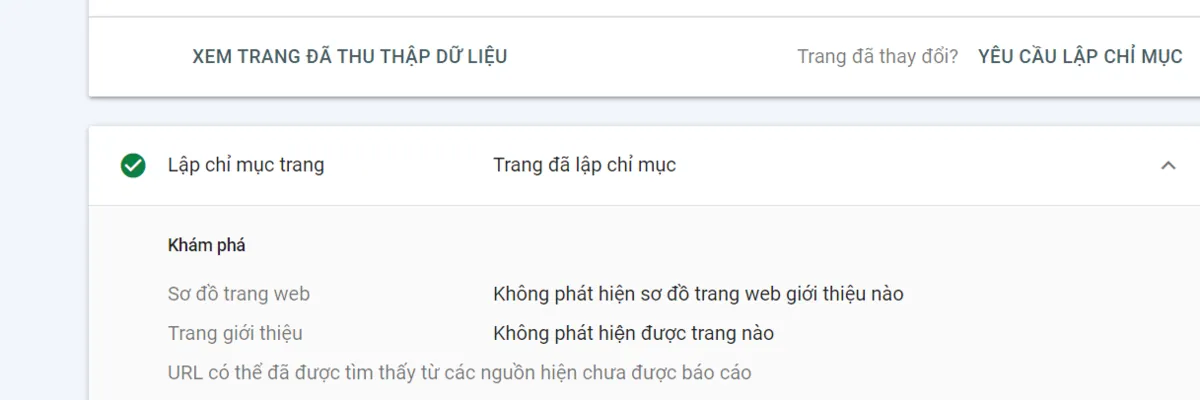
When you check the status of a URL in Google Search Console (GSC) and see the message “Discovered – currently not indexed”, don't panic. This is not a serious error, but it is a clear sign that Google is aware of the existence of your website but has not decided to include it in the search index. Basically, Google has "visited" your website, seen it through the sitemap or internal links, but for some reason, they temporarily ignored it and prioritized other pages.
This can happen with both new pages and pages that have existed for a long time. Understanding the root cause is the key to solving the problem. Based on Tan Phat Digital's practical experience, we have compiled the 5 most common causes and specific examples to help you easily visualize.
1. Content Quality: The Top Factor in Indexing Decisions
This is the most common cause, especially for new websites or those with a large amount of content. Google always prioritizes pages that bring real value to users.
Thin Content: Your page has too little information, just a few lines of description or a short paragraph of text. Google views this as low-quality content and not worth indexing.
Real-life example: An e-commerce website in Vietnam has thousands of product pages. Instead of writing a detailed description, they just write the product name, price and a single sentence "very nice product". Googlebot will consider these pages invalid and not index them.
Duplicate Content: Content on your page is identical or similar to content on other pages on the same website or on another website.
Real-life example: An online fashion store creates multiple pages for the same product but with different colors (eg: Blue men's T-shirt, Red men's T-shirt). If the descriptions of both pages are identical, Google will choose only one page to index and ignore the other page.
Lack of E-E-A-T: Google increasingly values content that demonstrates experience, expertise, authority, and trustworthiness (Experience, Expertise, Authoritativeness, and Trustworthiness). If your content does not demonstrate these factors, Google will not trust it and will not prioritize indexing.
Practical example: A personal blog about health, but the writer is not a doctor or nutritionist. Google will tend to ignore this content and prioritize articles from reputable websites, written by experts with clear qualifications.
2. Technical Issues: Invisible Barriers
Even if your content is great, technical errors can prevent Googlebot from crawling and indexing.
Blocking robots.txt file: The
robots.txtfile is where you instruct Googlebot which areas can and cannot be crawled. A wrong configuration can accidentally block the entire website or important folders.Practical example: A service website in Hanoi accidentally added the line
Disallow: /dich-vu/to therobots.txtfile, making it impossible for Googlebot to access and index all of their service pages.
Tags meta “noindex”: The
meta tag is an explicit directive telling Google not to index that page. Many websites accidentally leave this tag when moving from development environment to production environment.Practical example: After completing the website redesign, the development team forgot to remove the noindex tag on some pages, resulting in these pages never appearing in search results.
3. Missing Internal Links: “Forgotten” Pages
Googlebot works by moving from page to page via links. If a page isn't linked from anywhere, Googlebot will have a hard time finding it.
Orphan Pages: These are pages that do not have any internal links pointing back. Google can only detect them through the sitemap, but will not appreciate their importance.
Poor link structure: Unclear internal link structure, no strong connection between topics. This makes it impossible for Google to understand the relationships between pages and difficult to evaluate the value of the entire website.
Practical example: A food blog posts a new article about “traditional dishes of Ho Chi Minh City” but does not have any links from the homepage, category page or other related articles. Google may detect this page but will not prioritize indexing because it is not linked and does not have the “power” of other pages. Tan Phat Digital recommends that you use the Topic Cluster strategy to build effective internal links, helping Googlebot easily discover and appreciate your content.
4. Slow Page Loading Speed: The Silent Enemy of Indexing
Google prioritizes websites with fast loading speeds because it provides a better user experience. A slow-loading page can cause Googlebot to give up before it finishes crawling.
Suboptimal images: Using high-quality images that haven't been compressed or resized can slow down the page load significantly.
Suboptimal code: Bulky, uncompressed Javascript or CSS are also common causes variable.
Practical example: A website introducing restaurants in Ho Chi Minh City uses uncompressed images, with a capacity of up to several megabytes. When users access, the page takes up to 10-15 seconds to load, causing Googlebot to give up and move to another page. Page load speed optimization solution is one of the services we provide to ensure your website always operates effectively.
5. Limited Crawl Budget
For large websites, with thousands or tens of thousands of URLs, Google will limit the number of pages they crawl in a certain period of time.
Unimportant pages: Google will prioritize main pages, with many internal links, and give little priority to subpages, archive pages or expired product pages products.
Practical example: An e-commerce website in Vietnam adds hundreds of new products every day. Googlebot may crawl only a portion of it. To ensure important products are indexed promptly, you need to manage Crawl Budget by blocking unnecessary pages, optimizing key pages and using sitemap effectively.
The Ultimate Fix: Turn “Discovered” into “Indexed”
Now that you understand the cause, the fix becomes much simpler much.
Improve Content Quality:
Add information: For pages with thin content, write more useful and unique information. For example, for product pages, add detailed descriptions, benefits, usage instructions, and customer reviews.
Use exclusive content: Make sure your content is unique and not duplicated.
Check and Fix Technical Errors:
Check robots.txt: Use Robots.txt Tester tool in GSC to make sure any important pages are not blocked.
Check for noindex tag: Use URL Inspection Tool in GSC to check if the page contains noindex tag.
Clear URL structure: Make sure your URL structure is SEO friendly, easy to read and easy to read understand.
Increase Internal Linking:
Create links from pages with “authority”: Link from the home page, category pages or articles with a lot of traffic to make it easier for Googlebot to find new pages.
Create links in articles: Insert links naturally in the content content.
- Helps increase page loading speed for returning users.
Use CDN (Content Delivery Network): Ensure your website loads fast anywhere in the world.
Submit an Index Request:
This is the final step after you have fixed the above issues.
Use URL Inspection Tool in GSC and select "Request Indexing".
The status “Discovered – currently not indexed” is a signal that Google gives you to know that your website still has areas to improve. The problem can come from content that isn't valuable enough, technical errors, missing internal links, or slow page load speeds. Understanding and taking immediate action will help you optimize SEO effectiveness in a sustainable way. If you need a comprehensive and in-depth solution for this problem, please contact us, Tan Phat Digital, to receive free consultation and receive the leading SEO website design and website maintenance service services in Vietnam.
Share






