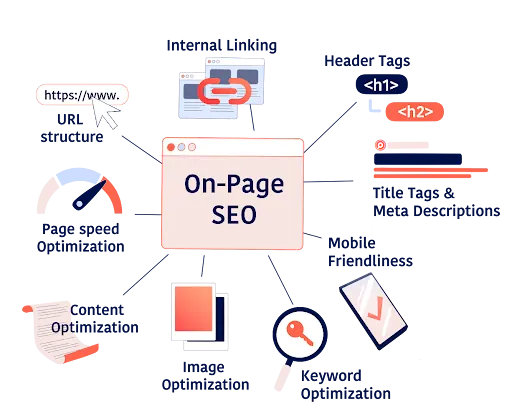
What is On-page SEO? Why do you need to understand it?
Onpage SEO is all the optimization activities right inside your website to help Google understand the content, appreciate the quality and increase the chances of appearing on the first page of search results. Unlike Offpage SEO - which are external activities such as backlinking or PR, Onpage SEO focuses entirely on structure, content, speed and user experience on your website.
Proper application of Onpage SEO Guide helps the website increase its rankings sustainably without spending too much budget on advertising. This is the core foundation for attracting organic traffic and turning visitors into leads. In addition, good Onpage optimization also directly improves how to optimize website performance, bringing the best experience to users. use.
12 steps of Onpage SEO standard Google 2025 - No need to know code to still do it
Below are 12 steps SEO Onpage standard Google 2025 that even non-technical people can still easily do:
Step 1: Choose main keywords and secondary keywords
This is the first and important step most. You need to identify the keywords your potential customers will search on Google to find your product/service.
How to: Use a free tool like Google Keyword Planner (requires a Google Ads account) or Ubersuggest (has a free version with limited searches). Enter topics related to your industry, and the tool will suggest hundreds of potential keywords along with search volume and difficulty.
Optimization: Make sure the main keyword and secondary (related) keywords appear naturally in: page title (Title), meta description (Meta Description), first paragraph of the article, in H1 tags, image file names and Alt Text, and 1-2 times in the content main.
Step 2: Write an attractive title with keywords
The page title (Title Tag) is the first element users and Google see.
How to do it: Google only displays about the first 50-60 characters of the title on search results. Write a title that contains the main keyword, has an attractive nature (for example, has data, promises, or attractive questions) to stimulate users to click.
For example: “Google Standard Onpage SEO Guide 2025 – For those who don't know how to code”.
Step 3: Optimize the description tag (Meta). Description)
The description tag (Meta Description) does not directly affect rankings, but is extremely important to attract clicks from the search results page.
How to do: About 150-160 characters long, should contain the main keyword and an attractive summary of the article content.
No need to know the code: You can easily enter This description can be found in the SEO settings of platforms (like Shopify, Wix, Haravan) or popular SEO plugins on WordPress like Yoast SEO or Rank Math.
Step 4: Use appropriate Heading tags H1, H2, H3
Heading tags (H1, H2, H3,...) help structure the article clearly and easily to read for both users and search engines.
How to do it: The H1 tag is used for the main title of the article, each page should only have a single H1. Large headings in the article should use H2 tags. If in H2 there are smaller headings, you use the H3 tag.
Benefits: Helps Google understand the structure and focus of your content, thereby appreciating and displaying the correct query.
Step 5: Optimize the URL (path)
SEO-friendly URL helps users and Google easily identify the content page.
How to: The path should be short, contain the main keyword, and have no special characters or random numbers.
For example: Instead of
www.namemien.com/p=123?cat=blog, usewww.namemien.com/seo-onpage-chuan-google-2025. Most website platforms allow easy URL editing in the post/page settings.
Step 6: Write quality, useful, natural content
This is the most important factor and the "soul" of Onpage SEO. Google always prioritizes content that brings real value to readers.
How to do it: Write articles with a length of 1200-2000 words (or longer depending on the competition), answer the searcher's questions correctly, present an easy-to-read presentation (appropriate paragraph breaks, use bullet points), have illustrative examples, images and specific evidence. Ensure unique content, not copied.
Step 7: Insert internal links
Internal links help Google discover other pages on your website and retain readers longer.
How to do: In the article, insert links to other articles or pages on your website that are related in content. Use Anchor Text (anchor text) containing the keywords that the landing page you want to SEO.
Benefits: Increase the ability of Google to index (crawl) the content, distribute SEO power (link juice) between pages, and improve users' time on the page.
Step 8: Optimize images
Images make content more attractive, but otherwise Optimization will slow down the website.
How to do:
Image file name: Rename the image file into Vietnamese without accents, with hyphens, related to the content and containing keywords (for example:
huong-dan-seo-onpage-2025.jpg).Alt Text: When Upload photos to the website, always enter Alt Text containing keywords. Alt Text describes the content of the image, helping Google understand what the image says and display it in image search results.
Size and capacity: Compress images before uploading with free tools like TinyPNG, Compressor.io. Use an appropriate image size (not too large).
Step 9: Check page loading speed
Page loading speed is an important ranking factor for Google.
How to do: You can use the free tool Google PageSpeed Insights or GTmetrix to check your website speed me.
Solution if slow: Compress images (like Step 8), use good quality hosting, delete unnecessary plugins, and consider using CDN (Content Delivery Network) if the website has a lot of traffic. This is an important factor in how to optimize website performance.
Step 10: Optimize display on mobile (Mobile Friendly)
With more than 70% of users accessing the web from phones, mobile optimization is mandatory.
How to do: Use Google's Mobile-Friendly Test tool to check your website.
Solution: Most modern website platforms (WordPress with responsive themes, Shopify, Wix) are mobile optimized. If your website is not mobile ready, ask a professional website design service in Ho Chi Minh like Tan Phat Digital to optimize it.
Step 11: Create a sitemap (XML Sitemap) and declare it to Google
Sitemap helps Google easily discover and index all pages on your website you.
No need to know code: You can install popular SEO plugins on WordPress like Rank Math or Yoast SEO. They will automatically create a sitemap for you and provide a link for you to submit to Google Search Console.
Declaring Google: Log in to Google Search Console (set up in Step 12), select "Sitemaps" and paste the sitemap link.
Step 12: Install Google Analytics and Search Console
These are two steps Free and extremely important tool for tracking SEO and user performance.
How to: Sign up with your personal Google account. Google Analytics helps you track traffic volume, traffic sources, user behavior (time on page, bounce rate). Google Search Console helps you monitor top keywords, search performance, and warn of technical errors on the website. Follow Google's step-by-step instructions to install tracking code on your website (there are often detailed instructions in website platforms).
The above steps are the foundation of Google Standard Onpage SEO Guide 2025, helping you confidently manage SEO for your website without worrying too much about code. These are also the factors that a professional web design service in HCM will focus on from the beginning.
Common mistakes to avoid when doing Onpage SEO
To ensure effectiveness and not be "penalized" by Google, you need to avoid the following mistakes:
Unnatural keyword stuffing: Don't try to put keywords in every sentence, every paragraph. This will make the content difficult to read, unnatural and negatively evaluated by Google.
Writing titles that do not match the content: The title must accurately reflect the content of the page. If the title is "headlining" but the content is irrelevant, users will leave the page immediately, increasing the bounce rate and harming SEO.
Ignore optimization of images and Alt text: Unoptimized images will slow down the website and cause Google to not understand the image content.
Content is too short, copied or does not bring value: Google prioritizes quality content quality, length and completeness. Content with little information, copied from elsewhere will be very difficult to reach the top.
Lack of internal links: Ignoring the creation of internal links not only reduces the ability of Google to discover the content but also reduces the time users stay on the page.
Not updating old content: SEO is a constant race. Old content needs to be reviewed and updated with new information to always be useful and consistent with search trends.
These small errors can cause your website to lose rankings significantly. Understanding Onpage SEO Guide and Google Standard Onpage SEO Guide 2025 - For those who don't know how to code will help you avoid these "pitfalls".
Tan Phat Digital - SEO standard website design solution from A-Z
You want to have an SEO standard website, fast loading, easy to use and friendly to Google but don't know where to start? Tan Phat Digital - specializes in providing website design services in Ho Chi Minh - is the ideal solution for you. Here, we:
Design SEO-standard websites without needing you to know how to code: We build websites with optimal structure, clean code, ensuring technical SEO elements are integrated from the beginning.
Pre-install SEO support plugins like Yoast or Rank Math: For platforms like WordPress, we pre-configure powerful SEO tools for you to easily manage Onpage.
Free guide to writing SEO standard articles: We will guide you how to create quality, SEO standard content without programming skills.
Optimize loading speed, SSL security, mobile responsiveness: Your website will be fully optimized for performance, security and experience on all devices.
Administrative support website, content creation and SEO strategy consulting:We not only hand over the website but also accompany you in the process of developing content and SEO strategy.
We understand that not everyone is technically savvy. Therefore, you only need to focus on products and customers, let website design services at Tan Phat Digital take care of the rest. With high quality cheap website making services, Tan Phat Digital is committed to providing a solid foundation for your online development.
Onpage SEO is not difficult if you have the right guidance and the right tools. Hopefully the article "Google Standard Onpage SEO Guide 2025 - For those who don't know how to code" will help you step by step optimize your website, increase Google rankings and reach more potential customers. Whether you do it yourself or hire a service, mastering Onpage SEO knowledge will help you save costs and optimize long-term effectiveness.
If you are in need of a website that is both beautiful - SEO standard - and easy to manage, contact Tan Phat Digital - a reputable and professional website design service in Ho Chi Minh.
📞 Zalo advises: 0374225294
🌐 Website: https://tanphatdigital.com
Share






