Favicon update time is not fixed, usually 2-6 weeks, but can last 1-3 months because Google caches Favicon for a long time and prioritizes crawling important content. Technical testing and patience are key.
This is an in-depth report that addresses a common problem in the webmaster and SEO community: Google's delay in refreshing site icons (favicons). This report delves into Google's cache mechanism and crawl budget allocation, and provides technical diagnostic steps to rule out website errors, especially in complex cases such as after recovering a website from a cyber attack. Tan Phat Digital's technical experts have compiled practical experience to provide an accurate update time frame and a thorough remediation strategy.
I. Technical Overview: The Placement and Importance of Favicons in SEO
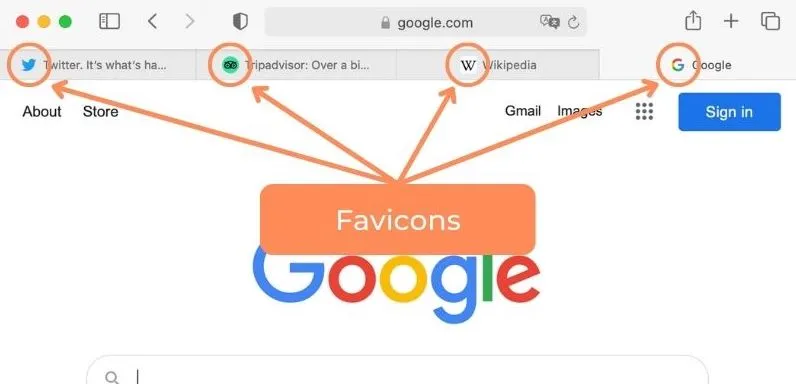
Favicon, short for "Favorite Icon," is a small graphic icon that represents a website. Despite their small size, the role of Favicons in the modern digital environment is crucial to user experience and brand recognition.
1.1. Favicons: Brand Recognition and User Experience (UX) Value
Favicons appear in many important places beyond browser tabs and bookmark lists, including browsing history, toolbar applications, and especially next to page titles (title tags) on Google search results pages (SERP).
Although Favicons are not a direct ranking factor in Google's algorithm, displaying a brand icon Consistent branding on the SERP plays an essential role in reinforcing recognition. Google emphasizes that Favicons help users "quickly identify your site as they scroll through search results." When displayed correctly, Favicons contribute to increasing trust and familiarity, indirectly positively impacting the click-through rate (CTR) of the website.
1.2. Eternal Problem: Old Favicon "Stuck" on Google Search
The phenomenon of Google still displaying the old Favicon while the website has long been changed is a common technical problem. This issue often leads to the misconception that this is a deployment error or misconfiguration on the website. However, if the website has high authority and has fully implemented technical steps, this delay is mainly due to Google's resource optimization strategy, specifically the long-term caching mechanism. This problem becomes more severe and persistent for websites that have recently experienced security incidents, attacks, or significant URL redirects.
II. Empirical Timelines
Unlike the content or key components of the URL, a Favicon is a static resource that is collected infrequently. Therefore, Favicon update time is not fixed and depends on many factors, including how often Googlebot-Image visits the homepage and Google's trust in the website.
2.1. Classifying Time Frames by Crawl Frequency and Website Status
Based on practical experience and observations from the SEO community, Favicon update time frames are divided into three levels:
Fast Updates (Several Days): This situation is very rare and usually only happens to websites with extremely high content update frequency and crawl rate, such as news sites large.
Regular Updates (2 – 6 weeks): This is the standard time period. Google uses a long-term Favicon cache mechanism to reduce the crawl request load, resulting in the Favicon Bot not needing to check this resource too often.
Slow Updates (1 - 3 months): This time frame is very common and is something that needs to be prepared in advance, especially for websites that have been attacked, redirected, or have major security errors. Google applies a "more cautious" policy to these websites, significantly slowing down the process of refreshing Favicon versions.
SEO experts confirm that, after completely eliminating technical errors on the website, within 4 - 12 weeks is when Google will almost certainly update the new Favicon.
III. Analyzing the Technical Mechanism That Causes Delay (Crawl Budget & Caching)
The delay in Favicon updates is not accidental but is a direct consequence of Google's resource optimization and budget allocation principles.
3.1. Data Collection Priority Principle: Favicon Bot vs. Googlebot Main
Googlebot performs many different functions, and Favicon crawling is assigned to a low-level crawler: Googlebot-Image.
Googlebot-Image is a Low-Level Crawler: Google gives absolute priority to crawling important and dynamic content such as on-page content, new links, and structural data. A favicon is a static asset that usually doesn't change, so Google just uses a low-level bot to test it. Even if a website indexes new content very quickly (in just a few hours), the Favicon still has to wait for the separate activity cycle of the Favicon Bot, which is set to crawl at a low frequency to save resources.
3.2. Aggressive Caching
A main technical reason for the delay is Google's long-term Favicon cache storage mechanism.
Reduce Server Load and Improve SERP Performance: Google Favicon cache aims to improve search engine results page (SERP) performance and reduce the number of requests sent to the website's server. Since a Favicon change is a rare event, Google doesn't need to check for it very often.
Synchronization Delay (Refresh Rates): Even if Googlebot-Image has discovered the new Favicon, there may still be a delay in refreshing the cached version across all of Google's various data centers and services. This sometimes results in the new Favicon being displayed on mobile devices but still the old version on desktop.
3.3. Crawl Budget Allocation
Google's crawl budget allocation has an indirect but significant effect on Favicon updates.
Cause and Effect Relationship: If a website has a limited crawl budget, or if other pages are judged to be more important for indexing, checking the Favicon will be downgraded in priority. This is especially true for new websites or those with poor server performance. The limitation of Crawl Budget leads to a reduction in the frequency of crawling the home page, resulting in the Favicon Bot rarely being activated to check for new resources.
Multi-Dimensional Impact: For new websites that do not yet have a high level of authority, Google spends precious Crawl Budget to determine the structure and core content instead of checking static resources like Favicons, increasing delay time. postponement.
IV. In-Depth Technical Diagnosis: Checklist to Rule Out Website Errors
Before concluding that the problem is due to Google's cache, the SEO expert must perform a rigorous technical diagnostic process to ensure that the problem is not due to an implementation error on the server. If all the steps below are performed correctly, the delay is purely due to Google's cache cycle.
4.1. Required Criteria and Crawlability
For a Favicon to be displayed, it must meet Google's basic guidelines:
Placement and Declaration: The Favicon must be declared with a
tag and located in thesection of the home page.Size and Proportion: The Favicon must be square (1:1 ratio) and have a minimum size of 8x8 px. Avoid using incompatible formats like JPEG or ensure image quality is not pixelated.
Stability and Crawlability: Favicon URLs should be persistent (not frequently changed). Most importantly, Googlebot-Image must be able to crawl the Favicon file; There must not be any
Disallowrules inrobots.txtthat block the directory containing this file.
4.2. 5-Step Process to Check and Fix Cache Conflicts
Perform this check to completely eliminate technical issues:
Check Source Code: Use the home page source code checker to confirm that the
tag is pointing to the new Favicon file path that has been uploaded.Access the Favicon URL Directly: Open the Favicon link directly (e.g.:
https://yourdomain.com/favicon.icoor the declared path) to ensure the browser correctly loads the new file.Comprehensive Cache Clearing (3 Layers): Cache conflicts are a leading cause of confusion. Cache must be cleared at all three levels:
Browser: Clear local cache or use Incognito/Force Refresh mode (
Ctrl/Cmd + Shift + R).CDN: Perform manual cache clearing (Purge Cache) on services like Cloudflare or similar equivalent.
Server/Plugin: Clear cache on hosting, Varnish, Redis, or CMS cache plugins (eg WP Rocket).
Check Old File Paths: For old websites or using CMS, it is necessary to carefully check that the default
/favicon.icofile (or old paths) has been deleted or replaced. with new version. The existence of old files can confuse Googlebot and browsers.Analyze with GSC (Google Search Console): Use the Inspect URL tool on GSC for the homepage. Then, check the "Live Test" section to see how Google reads the
section and recognizes the Favicon declaration.
Favicon Technical Checklist (Details and Corrective Actions)
Declaration Location
Meets Standards (Google): Tag
must be placed in theof the home page.Corrective Action: Move the declaration tag to
. Check for conflicts with Custom Code or plugins that are causing deployment errors.
Crawl Capability
Meets Criteria (Google): Googlebot-Image is not blocked by
robots.txtand Googlebot must be able to crawl the homepage.Remedial Action: Delete
Disallowfrom the Favicon folder or check therobots.txtrule in Google Search Console.
Cache Conflicts
Meet Standards (Google): New Favicon versions displayed via direct URL (e.g.:
yourdomain.com/favicon.ico).Remedial Action: Clear cache completely (CDN, Server, Browser).
URL Stability
Meeting Criteria (Google): Favicon URL must be fixed and not change frequently frequently.
Remedial Action: If the old Favicon persists, perform a Cache-Busting (change the filename or add a version parameter) to force Googlebot to treat the Favicon as a new resource.
Content/Quality
Meets Standards (Google): 1:1 ratio, minimum size 8x8px, and does not contain prohibited content (e.g. porn, hate).
Corrective Action: Redesign the Favicon, ensuring it is not pixelated and complies with Google's community guidelines.
4.3. Cache-Busting Strategy (Force Google Crawl)
In cases where delays extend beyond the standard timeframe, especially after security recovery, the Cache-Busting technique may be applied. Although Google recommends keeping Favicon URLs stable, changing the filename or adding a version parameter (for example, changing from favicon.png to favicon-2024.png or favicon.png?v=3) will create a new URL that has never been cached by Google. This action will force Googlebot-Image to treat the Favicon as a new resource and crawl it again, ignoring the old cached version.
V. Case Study and In-Depth Analysis: Delayed Updates After Security Incident
Delays in updating Favicon after a website is hacked, infected with malware or undergoes a malicious redirect is a serious problem, reflecting Google's decline in trust (Trust Decay) in that website.
5.1. Trust Decay and Recovery Analysis
When a website is hacked, Google applies a "more conservative" policy to all of that website's resources. The process of re-establishing trust takes time, and less important, static resources like Favicons often have the longest update delays (usually 1-3 months).
This delay is a combination of reducing the overall Crawl Budget and decreasing the absolute priority for static resources. Google prioritizes checking and confirming that the homepage is 100% clean of malware before it allows the Favicon Bot to crawl and refresh the version. If Google detects that the Favicon contains inappropriate content (for example, violence, pornography, or hate symbols), it will replace it with the default icon.
5.2. Case Study: Risk of Malicious Favicon Injection
There have been cases of malicious code being injected into a Favicon (.ico) file or this file being used as part of an SEO Poisoning attack. During these attacks, the Favicon can be changed into a phishing symbol or malicious code hidden in the Favicon file itself.
For websites that have encountered this situation, where the old Favicon was part of a security incident, Tan Phat Digital strongly recommends applying a Cache-Busting strategy immediately after cleaning the website. Renaming the Favicon not only helps bypass the long-term cache, but also signals to Google's systems that the resource has changed, helping the website quickly rebuild trust.
VI. Optimize Update Rate (Indirect Strategy)
Since Request Indexing cannot be used directly for Favicons, the only strategy to shorten waiting time is to improve Crawl Budget and increase the frequency of main Googlebot crawling the home page.
6.1. Ineffective Method: Request Indexing
Attempts to promote Favicon updates using the "Request Indexing" tool in Google Search Console for the home page or resubmitting the Sitemap were ineffective. The reason is that Request Indexing is mainly aimed at indexing content or updating important content, not a mechanism to refresh the cache for low-level static resources like Favicons. Favicon Bot operates on its own cycle and is independent of the content indexing process.
6.2. Strategies for Increasing Overall Crawl Frequency
To indirectly shorten the update cycle of the Favicon Bot, SEO experts need to focus on improving the overall health and crawl rate of the homepage:
Improve Server Speed:Ensure fast server Time To First Byte (TTFB) speed. Googlebot prioritizes crawling websites with high performance, because good server speed is a factor that encourages Google to increase Crawl Budget.
Keep the Home Page "Fresh": Regularly update important and valuable content on the home page to provide a good reason for the main Googlebot to visit more often. High frequency of visits to the home page will indirectly trigger the Favicon Bot to work.
Optimize Comprehensive Favicon Declaration: Although Google only uses one Favicon for SERP, accurately declaring all versions (for Android, iOS, Windows) helps increase technical consistency and cross-platform compatibility, creating a quality signal for Googlebot.
VII. Frequently Asked Questions (FAQ) About Technical Favicons
7.1. Is it necessary to create multiple versions of a Favicon for a website?
Yes, creating multiple versions of a Favicon in different sizes and formats is a good practice to optimize user experience (UX) and ensure consistency across all platforms.
Comparing Benefits and Challenges:
Benefits of Multiple Sessions version:
Optimized display on different devices and browsers (e.g. Apple Touch Icon for iOS Home Screen, version for Windows Tile).
Ensures high quality (not blurry/pixelated) images on high-resolution (Retina) displays.
Provides a consistent experience, including optimal display in the browser's Dark/Light Mode.
Challenges of Multiple Versions:
Increased code implementation complexity due to the need for multiple tags
in.Risk of cache conflicts between versions if declarations are inconsistent or if files are not managed properly.
7.2. Is the error displaying Favicon on the browser (Browser Cache) a Google error?
Not necessarily. The browser has a very powerful local Favicon caching mechanism to increase page loading speed. If the new Favicon displays properly when accessed via Incognito Mode or after clearing the browser cache, the problem is with the user's local cache, not Google's index cache.
7.3. Should I use .ico or .png format for my Favicon?
Both formats are accepted, as long as the size meets the 1:1 requirement and is at least 8x8px. The traditional .ico format is capable of containing multiple sizes in a single file, ensuring extensive backward compatibility. However, the .png format is often more modern and easier to optimize in terms of file size (Favicon must be very small in size, only a few KB so as not to significantly affect page loading speed).
7.4. Do favicons affect page loading speed?
Favicons are usually very small in size, only a few KB. Therefore, its impact on page loading speed is negligible, even if the Favicon is cached well, it also helps reduce server load. However, optimizing Favicon file size and ensuring image quality is a good practice in Technical SEO.
Deferring Favicon updates is a well-defined technical phenomenon, originating from Google's resource optimization strategy and robust caching mechanism. If the technical diagnostic process (Section IV) has been completed and the new Favicon displays correctly on the server, the SEO expert can conclude that the problem is because Google has not refreshed the cache. A safe waiting time frame is 4-12 weeks.
It is important that patience goes hand in hand with technical proactivity. It is not possible to directly promote the Favicon Bot, but improving Crawl Budget, ensuring server speed, and maintaining overall website health is the only way to indirectly shorten the update cycle.
To maintain a consistent brand identity and ensure Favicons are updated as quickly as possible, webmasters should: (1) Always adhere to Google's technical implementation guidelines; (2) Keep Favicon URL stable; and (3) Only apply Cache-Busting (file renaming) techniques in cases facing serious delays or after security recovery. Effective Favicon management is a small technical detail, but it reflects professionalism in the overall Technical SEO picture.
Is your website facing persistent technical problems such as old Favicons refusing to update, cache conflicts, or Crawl Budget being limited after being hacked? Let Tan Phat Digital—a team of Technical SEO experts specializing in website crawling and recovery mechanisms—analyze it thoroughly. We will identify the technical cause, apply thorough remediation strategies, help you restore Google's trust and comprehensively optimize website performance. Contact immediately Tan Phat Digital to receive an in-depth Crawl Audit analysis report.
Share






