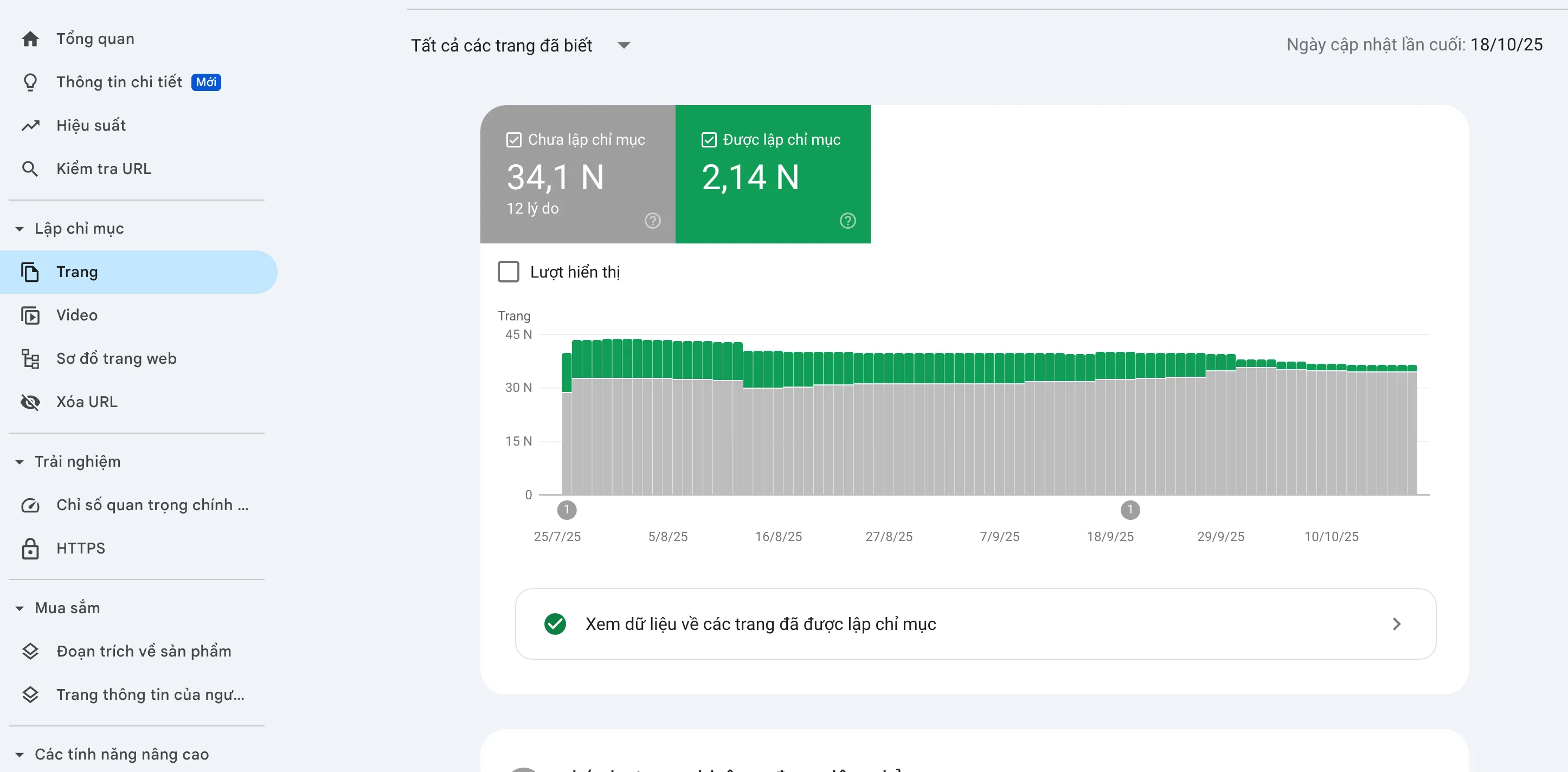
Recently, the issue of indexing on Google Search Console (GSC) has become a hot topic, of interest to many website administrators and SEOers. The status of Google not indexing (Not Indexed) not only affects visibility but is also a warning signal about the technical health of the website. This article, drawn from the real-life experience of the Tan Phat Digital team, will provide detailed and thorough instructions for handling common errors in the Not Indexed group.
I. Understanding Google's Indexing Mechanism
Before diving into error handling, you need to master the process by which Google interacts with your website. Tan Phat Digital always emphasizes the importance of properly understanding this mechanism:
Discover: Google Bot finds your URL.
Crawl: Google Bot accesses (scans) that URL, downloads and processes the page content.
Index category): If the page is assessed as quality and does not have serious technical errors, it will be included in Google's database.
Serve (Serve/Rank): The page has the ability to display and rank on search results (SERP).
On GSC, Page indexing is divided into two main groups: Indexed (Group Green) and Not Indexed (Gray Group).
General Processing Principles for Not Indexed Group
Classification: Drill down into each specific cause, review each URL to determine whether that URL should be indexed or not.
Treat the root cause (Root Cause):
If it is the intention: No need to do anything, or block
robots.txtif not necessary.If indexing is needed: Find and handle technical/content errors. Then ask Google to re-index (Inspect URL, using indexing tools).
Validate: After completing processing, click Validate Fix in GSC to let Google collect and re-read the latest data.
II. Detailed Analysis and Solution for Each Cause Google Doesn't Index
Below is a detailed analysis of the main reasons why pages aren't indexed (Why pages aren't indexed?), along with in-depth troubleshooting steps from Tan Phat Digital:
1. Discovered – Currently Not Indexed
Description & Cause: Google has seen the URL but has not crawled it yet (Crawl). Usually because Crawl Budget is limited or the website has too many unimportant pages.
Thorough Treatment Directions:
Optimize Crawl Budget: Remove unnecessary links from the Sitemap. Block unimportant pages (e.g. old
/tag/,/archive/pages) withDisallowinrobots.txtornoindexto focus bots on important pages.Build strong internal linking (Internal Linking) to the needed page index.
Check
noindex,robots.txtandSitemaptags for unusual errors.
2. Crawled – Currently Not Indexed
Description & Cause: Google crawled but decided not to index. The main reason is that the equipment is rated as poor quality (low value) such as thin content, duplicates or technical errors.
Thorough Handling Directions:
Improve Content: Avoid thin content (Thin Content), duplicate content (Duplicate Content). Add detailed, unique information that fully meets search intent (Search Intent).
Check for Technical Errors: Ensure good Core Web Vitals, smooth user experience (UX) on Mobile.
Remove or optimize pages with "keyword cannibalism" errors (Keyword Cannibalization).
3. Excluded by Noindex Tag (Excluded by 'noindex' tag)
- error: Remove
noindex tag from source code. Then, Request Indexing goes through GSC again.4. Blocked by Robots.txt (Blocked by robots.txt file)
Description & Cause: The URL is blocked from crawling (Crawl) by the
Disallowcommand in therobots.txtfile.Complete Handling Instructions:
If is intended: Do nothing (for example, block admin folders).
If it is an error: Delete the
Disallowdirective related to that URL in therobots.txtfile. Note, blocking Robots only prevents Crawl and is not guaranteed to prevent Index 100%.
5. Duplicate, Google chose different canonical than user (Duplicate page, Google chose a different canonical page)
Description & Cause: The URL has a Canonical Tag declared (canonical page) but Google chose a better URL to index because the content is too similar or the Canonical Tag is set incorrectly.
Thorough Handling Instructions To:
Unify URLs:Fix common technical errors such as: URLs with a "/" at the end (Trailing Slash) and no "/" at the end. Choose a consistent format for the entire website.
Re-evaluate Canonical: Make sure the content of different URLs are truly different. If they are the same, trust Google's choice or adjust the Canonical Tag correctly.
6. Duplicate Without User-Selected Canonical (Duplicate page, user has not selected the canonical page)
Description & Cause: The URL is considered duplicate without the Canonical tag. Often happens with pagination pages (
/page/2),feedpages (/feed/).Thorough Handling Directions:
Attach Canonical: Tag Canonical to the main page (for example: page
/page/2points Canonical to the page root).Block Crawl/Index: For unnecessary pages (like
/feed/), you can completely block them withrobots.txtor usenoindexto save Crawl Budget.
7. Alternate page with proper canonical tag replace" and no index needed.
If it is an error: Adjust the Canonical tag, making sure it points to itself if it is the main page.
8. Page with Redirect
Description & Cause: The URL is being redirected (301/302) to another URL. Google will index the destination URL.
- Make sure the redirect URL is a valid URL.
9. Redirect error
Description & Cause: Serious error due to too long redirect chain, looping redirect (A $\rightarrow$ B $\rightarrow$ A), or redirect to invalid URL.
Complete Solution:
Check the redirect chain with specialized tools
Remove looped redirects.
Make sure the redirect's destination URL returns a 200 OK code.
10. Server error (5xx)
Description & Cause: URL returns Server error code 5xx (500, 503, 504...). The server is unstable or overloaded.
Thorough Solution:
Contact the Hosting provider to check and upgrade server performance.
Make sure the URL returns code 200 OK (Success). After fixing, request Index again.
11. Not Found (404)
Description & Cause: The URL does not exist, return code 404.
Complete Action:
If the URL is no longer needed: Do nothing. Let Google de-index over time.
If the URL is important: Fix the error so the page returns 200 OK. If content is moved to a new page, create a 301 redirect to the new page.
Tan Phat Digital recommends leveraging 404s for UX by creating a friendly 404 page.
12. Soft 404
Description & Cause: The URL has no main content (e.g. empty product page, out of stock category) but returns code 200 OK instead of 404. Google believes this page should be 404.
Correct Action To:
If the page is still in use: Add content, products, or 301 redirect to a page with equivalent content.
If the page is no longer in use: Make sure it returns a 404 Not Found or 410 Gone code and block crawling with
robots.txtif necessary set.
13. Indexed, though blocked by robots.txt To:If blocking is NEEDED: Remove the Disallow directive in robots.txt, then add the noindex tag to that page. This allows Google Bot to read the noindex tag and remove the page from the index. After the page has been de-indexed, you can re-add Disallow to save Crawl Budget.
If blocking is NOT needed: Delete the Disallow directive in robots.txt so that Google Bot can crawl and update content normally.
If blocking is NEEDED: Remove the Disallow directive in robots.txt, then add the noindex tag to that page. This allows Google Bot to read the noindex tag and remove the page from the index. After the page has been de-indexed, you can re-add Disallow to save Crawl Budget.
If blocking is NOT needed: Delete the Disallow directive in robots.txt so that Google Bot can crawl and update content normally.
III. Technical SEO Principles to Support Indexing
To ensure indexing goes smoothly and avoid falling into the Not Indexed group, Tan Phat Digital recommends implementing the following technical optimizations:
Robots.txt & Noindex: Regularly check the
robots.txtfile and page source code to ensure There are no mistaken blocking orders. Use therobots.txt Testertool in GSC.Sitemap XML:
Create and periodically update the Sitemap XML file.
Only include URLs that need Google Index to Sitemap.
Submit Sitemap to GSC to inform Google about the structure website.
Internal Links (Inlink): Build a reasonable internal link network, using descriptive Anchor Text. Helps Google Bot easily Discover deeper pages.
Speed & Experience: Ensures fast page loading speed and Mobile-friendly interface.
Content Quality: Ensures content is unique, in-depth, and meets users' Search Intent exceedingly dominant.
IV. Frequently Asked Questions (FAQ) about Google Not Indexing Error
1. After fixing the error, how long does it take for the page to be re-Indexed?
Answer: Re-Index time depends on Crawl Budget, reputation level of the domain name, and severity of the error.
It usually ranges from a few days to a few week.
Tan Phat Digital recommends that you be patient, regularly check and perform Validate Fix after completing the repair.
2. Do all URLs in the Not Indexed group need to be processed?
Answer: NO. The Not Indexed group (gray) always exists on any website and is considered Notices and not strictly Errors.
The goal is to ensure all important and necessary URLs for SEO must be in the Indexed group.
3. What is the difference between "Soft 404" and "Not Found (404)"? (Compare List format)
Soft 404 (Soft 404):
HTTP status code: 200 OK (Success).
Displayed content: Almost no main content (empty page, loading error).
Google rating: Page should be 404 but it says 200. This is a technical error that needs to be fixed.
Not Found (Hard 404):
HTTP status code: 404 Not Found.
Displayed content: Error page 404.
Google reviews: Page does not exist. This is the correct state.
4. What is Crawl Budget and how to optimize?
Answer: Crawl Budget is the number of pages Google Bot is willing and able to crawl on your website in a certain period of time.
Optimal way:
Increase page loading speed (Server Response) Time).
Block
robots.txtunnecessary pages.Use
noindextag for pages with thin content.Control redirects (Redirect Chain).
Handling Google not indexing errors requires a deep understanding of SEO techniques and mechanisms Google's activities. You need to clearly understand the URL structure on your website, accurately classify pages that should be indexed and should not be indexed, and then apply the most thorough solution. Don't worry too much about the Not Indexed number, focus on the quality of the necessary pages and make sure they are in the Indexed group.
Are you having difficulty handling complex technical errors on GSC and need a thorough solution?
Tan Phat Digital with in-depth experience in Technical SEO and Website Audit will help you:
Thoroughly analyze Not Indexed errors, identify Root Cause.
Optimize website structure and Crawl Budget.
Ensure website speed and performance meet Google standards.
Please Contact Tan Phat Digital immediately for advice and comprehensive SEO solutions, helping your website to always be indexed and ranked optimally by Google!
Share






