I. Executive Summary and Incident Overview
1.1. Case Summary: Japanese SEO Cover Up Attack Profile
This incident, which was the focus of Tan Phat Digital's analysis, belongs to a group of complex attacks known as "Japanese SEO Spam" or "SEO Poisoning". This is a sophisticated black hat tactic that targets websites using Content Management Systems (CMS), especially WordPress, to exploit vulnerabilities and inject malicious code. The main goal of this attack is to create a series of unwanted spam pages stuffed with hidden Japanese keywords or displaying gambling interfaces and advertising fake goods.
The malware's modus operandi is based on cloaking, a method of deceiving search engines. Hackers use server-side scripts to analyze incoming HTTP requests. If it is identified as a search engine crawler (like Googlebot), the system will display malicious content (for example, Japanese spam or gambling pages). In contrast, regular users visiting the site still see a legitimate appearance, making visual detection extremely difficult. This issue has become widespread, with researchers identifying 692,865 fake e-commerce sites involved in black hat SEO campaigns, including this type of Japanese keyword hacking, between May 2022 and December 2024.
1.2. Severity Impact Assessment (SEO, Reputation, Technical Cost)
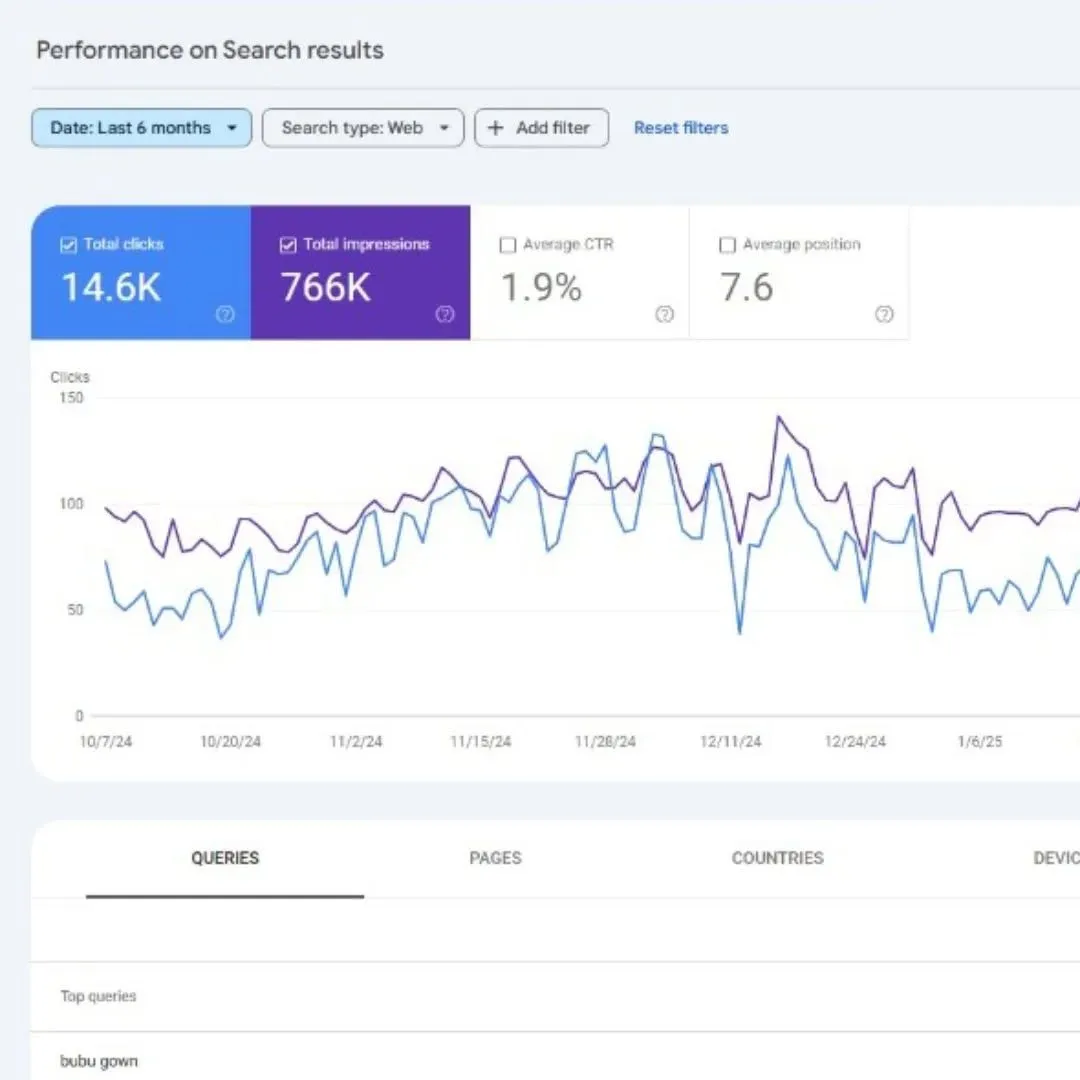
The consequences of the attack are immediate and severe. The first is a severe drop in SEO rankings due to Google penalizing the website for hosting deceptive content. Next, Google can blacklist the site, resulting in de-indexing and displaying a "This site may have been hacked" warning on search results, severely reducing user trust and disrupting entire revenue streams.
In terms of compliance, cloaking is a direct violation of Google's spam policies, leading to a high risk of a Manual Action penalty. The remediation process requires significant engineering costs, including in-depth malware scanning, digital forensic analysis to find the root vulnerability, and subsequent integrated security measures.
1.3. Three-Phase Approach: Triage, Remediation, and Hardening
To systematically handle this complex incident, the Incident Response process is divided into three main phases, to ensure isolation, complete removal of malware, and build sustainable resilience:
Phase I: Isolation and Emergency Response (Containment): Isolate the infected system, change all credentials, and conduct a preliminary scan.
Phase II: Eradication: Thoroughly clean files, databases, and installed backdoors, ensuring system integrity.
Phase III: Restore SEO and Resilience:Tackling indexed spam URLs, submitting reconsideration requests to Google, and deploying advanced defense architecture to prevent reinfection.
II. Technical Analysis of Cloaked Malware
2.1. SEO Poisoning Anatomy and the Vulnerability Landscape
The WordPress platform, despite its popularity, is a top target for hackers, accounting for about six out of ten hacked sites. This popularity, combined with the increasing rate of security vulnerabilities, has allowed attacks to spread. Specifically, the number of recorded vulnerabilities in WordPress has increased significantly, with 7,966 registered vulnerabilities last year, an increase of about 34% compared to 5,947 recorded vulnerabilities in the previous year.
This increase demonstrates the urgent need to adopt robust patching protocols. Hackers are now using automated bots and machine learning to scan thousands of WordPress sites in seconds, looking for outdated core versions, plugins, or themes.
2.2. Mechanisms of Concealment: Avoidance and Content Differentiation
Clearing techniques are at the core of this attack. The malicious code uses server-side scripts, often inserted into critical system files such as .htaccess or core PHP files, to perform access request analysis. When a request is determined to be from a search bot, fraudulent content (Japanese/gambling) is served; On the contrary, regular users will see clean content.
2.2.1. Static Detection Evasion Techniques (Skip Protection Layer 1)
Traditional cloaking techniques rely on checking static crawler identifiers:
User-Agent and IP Range Check: Malicious script checks the declared identity of visitors (e.g.
Googlebot/2.1) and compares their IP addresses with published IP range lists of search engines such as Google or Bing.Exploiting the Referrer Header: By examining the
HTTP_REFERERheader, malware can determine whether the traffic is coming directly from a search engine results page (SERP). If so, malicious content will be triggered, as these visits are often bots.CSS and JavaScript conditions: Malicious code can use CSS conditions (e.g.
display: none;) or JavaScript to make malicious elements invisible to script-enabled browsers (i.e. regular users), but still completely readable to text-only crawlers.
2.2.2. Advanced Evasion: Behavioral Monitoring and Fingerprinting
Cloaking services have evolved into a “cloaking-as-a-service” ecosystem, using artificial intelligence (AI) and machine learning to evade censorship systems. This evolution forces defense systems to overcome simple IP and User-Agent filters, especially as Google has begun deploying information-gathering bots that simulate real user behavior.
To deal with this sophistication, advanced evasion techniques include:
Behavioral Analysis: Track interaction patterns such as mouse movements, keyboard input, and website access speeds to distinguish real users from automated bots. Page visits that are too fast or automated browsing patterns may be flagged as bots.
Browser Fingerprinting: Detects headless browsers and automation tools such as Selenium, Puppeteer, or PhantomJS, commonly used by security researchers and censorship tools.
Skip Analysis (Anti-Forensics): Some malware packages contain mechanisms such as self-destruct functions that delete malware if
_REQUESTvariables used during forensic analysis are detected. Advanced cloaking systems also attempt to block developer actions in the browser to prevent viewing of the source code.
2.3. Malicious Code Concealment and Access Maintenance Tactics
To maintain access and avoid detection, malware uses obfuscation and backdoor tactics:
Payload Concealment: Malicious code is often complicated with Base64 encoded strings or long variable names to make manual analysis difficult. The use of PHP executable functions such as
eval,gzinflate,str_rot13, andbase64_decodeis a common sign of hidden malware.Resilient Backdoor: Hackers often place backdoors in locations that administrators rarely check:
Inactive Theme: This is an ideal place to hide malicious code because the code in an inactive theme will not be overwritten when WordPress updates, allowing continuous access.
Uploads folder: The
/wp-content/uploads/folder typically contains thousands of media files. Hackers can insert malicious PHP files masquerading as media files here.Critical Core Files: Files such as
wp-config.php(which contain sensitive information about the database) and files in thewp-includes/directory are also targets for malicious code injection.
Search Infectious Directories: Some malware strains are designed to identify potentially infectious directories by examining process owner information and cross-referencing with server configuration files.
III. Phase I: Critical Incident Response and Isolation (Containment)
The incident response procedure must be carried out methodically to ensure that the site is immediately protected from further infection and to avoid harm to visitors.
3.1. Implementing Site Isolation and Maintenance
The absolute first action step is site isolation. Enable maintenance mode or use a Web Application Firewall (WAF) to block all unnecessary public traffic.
Site isolation is crucial to prevent Google from indexing new spam content and protect visitors from malicious redirects. In cases where clean backups are available, restores should be performed on a separate staging (test) environment first. This allows the engineering team to diagnose, verify backup integrity, and perform cleanup without the risk of further damage or re-infection of the live site.
3.2. Procedure for Resetting Credentials Immediately
To cut off hacker access, credential rotation is mandatory. Must reset all system-related passwords: WordPress admin account, FTP/SFTP account, database login information, and hosting control panel password.
In addition, it is necessary to change the secret keys (Secret Keys) in the wp-config.php file. This action immediately disables all current user sessions, including sessions the hacker may be using, forcing them to log in again.
3.3. Initial File Integrity Scan and IoC Identification
Use security tools to scan for malware, especially file integrity monitoring (FIM) tools. FIM compares the cryptographic hashes of current files to a "known-good" baseline.
The focus should be on checking recently modified files, as these are important Indicators of Compromise (IoC), helping to determine the initial time and location of the infection.
3.4. Analyze Server Logs to Identify Initial Intrusion Vector
A thorough review of server logs (access logs, error logs, security logs) is an essential step. Look for unusual behavior that occurred before the infection date, such as large numbers of new POST requests (indicating unauthorized file uploads), centralized password brute force attempts, or unauthorized administrative activities.
IV. Phase II: Comprehensive Malware Remediation (Deep Cleaning and Eradication)
4.1. Core File Cleanup: Establishing Integrity
Manual cleanup can be complicated and error-prone. The most reliable method is to replace infected WordPress core files with clean, verified copies.
First, determine the exact version of WordPress running by looking at the wp-includes/version.php file. Then, download a clean install that exactly matches that version from the official WordPress site. Replace all potentially infected core files with clean copies. Using a core version that does not exactly match can cause unexpected errors or crashes, further complicating the recovery process. Therefore, meticulous version reconciliation is mandatory to minimize instability after cleanup.
4.2. Fix Plugins and Themes: Replace Carefully
Clean Replacement Protocol: Download new copies of all active themes and plugins from the official repository or trusted provider, then replace the existing folders in
/wp-content/plugins/and/wp-content/themes/.Manual Review: For custom or paid theme or plugin files that are not original in a public repository, manual review is required. Must look for obfuscated code functions such as
base64_decode,eval,gzinflate, andstr_rot13, as this is a sign that malicious code has been inserted.Remove Source of Infection: Remove all inactive or forgotten themes and plugins. These components are often the main refuge of persistent backdoors and are forgotten targets during the patching process.
4.3. Disinfect the Database
Malicious code not only resides in files but is also inserted into the database. A comprehensive scan of high-risk tables such as wp_posts (post content) and wp_options (theme/plugin settings) is required to look for malicious content injections, JavaScript redirects, or encrypted PHP functions.
Any unauthorized administrative user accounts created after being hacked should be immediately reviewed and deleted, as hackers use these accounts to maintain administrative access.
4.4. Backdoor Removal and Reinforcement Directive
4.4.1. Checking High-Risk Files
The wp-config.php file and core theme functions files (functions.php) should be thoroughly checked for any added malicious PHP code. Also, scan the wp-content/uploads folder to make sure no executable files (like PHP files) exist.
4.4.2. Cleaning up Malicious .htaccessDirectives
The .htaccess file is a favorite location for attackers because it allows routing and control of traffic before WordPress or PHP begins processing the request. Malicious code often inserts cloaking or redirection rules here, based on User-Agent or Referrer. It is necessary to download the .htaccess file and compare it with the clean or known version, removing all malicious redirection rules, especially those using RewriteCond %{HTTP_USER_AGENT} to target search engine crawlers.
4.4.3. Prevent Retention
An important hardening measure is to prevent PHP execution in unnecessary directories, especially /wp-content/uploads/. This is done by adding a .htaccess directive to that directory, preventing file inclusion attacks if a hacker tries to upload a new backdoor.
The following is a file and database cleanup checklist:
File and Database Cleanup Checklist (Phase II Action Plan)
Core Files (WP)
Required Actions: Replace all files with clean downloads that match the exact version.
Verification Check: Run a comparison of the cryptographic hash function with known clean files.
Plugins/Themes
Action Required: Remove inactive components; replace active components with copies from repository/vendor.
Verification Checks: Manually check custom/paid files for hidden code (e.g.
eval, Base64).
Backdoor (.htaccess)
Action Required: Download and compare the
.htaccessfile to the clean baseline, removing all malicious redirects/rules.Verification Testing: Verify the website is working properly; check the URL parameters that enable cloaking.
Spam Database
Action Required: Scan
wp_optionsand post content for injected JavaScript, iframes, and encrypted functions.Verification Check: Remove malicious user accounts added after hacking; Change WordPress Secret Keys.
Authentication Information
Action Required: Reset all passwords (Admin, DB, FTP, CPanel).
Verification Check: Implement Two-Factor Authentication (2FA) for all administrative accounts.
V. Phase III: Search Engine Recovery and Compliance
Once the site has been thoroughly cleaned, the next step is to restore its SEO reputation and remove spammy URLs from Google's index.
5.1. Handling Indexed Spam URLs
Since Japanese SEO malware can create thousands of new spam pages, managing these indexed URLs is an important task. It is necessary to compile a complete list of spam URLs through server logs and Google Search Console.
A permanent removal strategy is required. When spam pages are removed from the server, they should return a 410 Gone status code, instead of 404 Not Found. The 410 code signals to Googlebot that the content has been permanently removed and should not be attempted again, making deindexing faster than 404.
Google will automatically remove 410 returns, but this can take months for large numbers of URLs. To speed removal without relying on the URL Removal tool in Google Search Console (limited to 100 URLs at a time), the best practice is to create a temporary sitemap containing all URLs that return 410s. Submitting this sitemap to Google forces Googlebot to prioritize crawling these "dead" pages, significantly shortening de-index time.
5.2. Google Search Console Cleanup and Request for Reconsideration
First, it is necessary to check and remove any Search Console accounts that were illegally created by hackers to monitor or control the website.
Then, if the site is subject to a Manual Action penalty, a Reconsideration Request must be submitted through the Manual Action report. The request must be detailed, providing evidence of a thorough cleanup, the results of a Root Cause Analysis (RCA) performed, and permanent security hardening measures that have been applied.
Finally, submit a clean, verified sitemap to Google, signaling that the correct structure of the site has been restored, aiding in the re-indexing process.
VI. Root Cause Analysis (RCA) and Vulnerability Mapping
The purpose of RCA is to accurately identify the original intrusion vector, not just eliminate symptoms.
6.1. Identify Specific Exploit Vectors
The vast majority of WordPress hacks occur through exploiting known vulnerabilities (CVEs) in outdated, unpatched core software, themes, or plugins.
6.1.1. Analyze Known Vulnerabilities
Common types of vulnerabilities include Stored XSS. For example, popular plugins like WP Shortcodes Plugin — Shortcodes Ultimate have been identified as having an XSS vulnerability (CVE-2024-8500), which can be exploited by users with Contributor level or higher. Exploitation of these weaknesses provides an initial entry point for malicious script injection.
6.1.2. Shortcode-Specific Threats and Input Sanitization Flaws
A notable exploit vector for cloaking attacks is Input Sanitization Flaws, especially in plugins that use shortcodes to display user data.
Some plugins are designed to display information such as user IP (e.g., "Current Year, Symbols and IP" plugin Shortcode"). These plugins often get the IP address from the X-Forwarded-For HTTP header without properly filtering or encoding the output. This creates a Stored XSS vulnerability: the attacker sends a request with the X-Forwarded-For header containing a cloaked malicious payload (e.g., PHP or JavaScript code). This malicious code is then stored in the database and executed when the page containing that shortcode is loaded. Hackers design the payload to only activate when Googlebot visits, perfect for SEO cloaking.
6.2. Initial Access Point Vulnerability Mapping
Conclusion RCA must link forensic evidence (file timestamps, logs) to the specific vulnerability. If the plugin files were modified shortly before the malware appeared, and the plugin is known to have a stored XSS vulnerability, this confirms it as an intrusion vector. This analysis is fundamental to preventing future reinfections.
The following is a list of common vulnerability vectors:
Common Vulnerability Vectors Leading to Covert Attacks
Unpatched Software (CVE)
Description & Exploit Mechanism: Exploits known vulnerabilities (e.g. XSS in Plugin Shortcode, CVE-2024-8500).
Forensic Evidence: File modification timestamp before the last patch date; Vulnerable components have been installed.
Mitigation Strategy: Strict adherence to patching protocol; Regular automated vulnerability scans.
Weak Credentials/Password Detection
Description & Exploit Mechanism: Unauthorized login allows attacker to download malicious files or install backdoors.
Forensic Evidence: Multiple failed login attempts in log; Unwanted new admin user was created.
Mitigation Strategy: Strong, unique passwords; enforce 2FA; protection against Password Forecasting (WAF/Login Limiter).
Input Filtering Error
Description & Exploitation Mechanism: Exploits features that expose unfiltered user data (e.g. IP address shortcode via X-Forwarded-For header).
Forensic Evidence: Malicious code detected in database fields or theme options via Stored XSS.
Mitigation Strategy: Validate input and escape output (safe coding practices); immediately remove vulnerable components.
Include File/Upload
Description & Exploit Mechanism: Malicious files masquerading as media are uploaded to
/wp-content/uploadsor other weak directories.Forensic Evidence: Detect executable files (e.g. PHP) in media folders.
Mitigation Strategy: Restrict PHP execution in non-essential folders via
.htaccess.
VII. Advanced Defense Architecture and Prevention
To ensure resilience and prevent reinfection, it is necessary to deploy proactive defense measures that go beyond simply updating software.
7.1. Implement Active File Integrity Monitoring (FIM)
File Integrity Monitoring (FIM) is a critical layer of defense, often required by compliance standards such as PCI DSS and NIST CSF.
FIM works by establishing a hash baseline of the "clean" state of all system files. It then continuously or periodically compares the current state of those files with the baseline. Any detected discrepancy—whether editing, deleting, or moving files—triggers an alert to the administrator. FIM is not only an early detection tool but also an important forensic tool, providing a detailed audit log of who, which processes, what changes were made, and when. This visibility is essential for deeper RCA and demonstrating compliance in audits.
7.2. Web Application Firewall (WAF) Strategy: Cloaking Defense Options
Deploying a WAF is required to filter malicious traffic and protect against common vulnerabilities.
In the context of covert attacks, the choice of WAF architecture is very important. Cloaking attacks rely on accessing the server to inspect HTTP and IP headers. Therefore, a Cloud WAF or CDN-level protection (e.g., Sucuri, Cloudflare) will block malicious traffic and known crawler IP ranges at the network edge. This prevents malicious traffic from consuming server resources or activating cloaking scripts. This architecture outperforms local WAF plugins (like Wordfence), which only start scanning and blocking after traffic has reached the WordPress server, which can cause latency or consume significant server resources. Furthermore, cloud solutions like Sucuri offer a content delivery network (CDN) and unlimited DDoS mitigation, features not available in local WAF solutions.
7.3. Next-Generation Bot Detection Techniques
To combat sophisticated AI-based cloaking techniques and Google crawlers that simulate human behavior , it is necessary to apply advanced bot detection tools that use multi-layer analysis (up to 15 or more detection methods).
These methods include:
Behavioral Monitoring: Tracks physical interaction patterns (mouse movements, input) to ensure they match human behavior.
Browser Fingerprinting: Detects headless browsers and automation tools such as Selenium, Puppeteer, or PhantomJS, is commonly used by security researchers and censorship tools.
Honeypot Traps: Deploy invisible URL or email traps designed so that only automated bots can interact, improving detection.
Speed Analysis: Identify automated browsing patterns and unusually fast page accesses.
These techniques help distinguish legitimate whitelisted crawlers (Google, Bing) from malicious cloaking bots, even when they attempt to mimic user behavior.
The following is a list comparing the capabilities of major security solutions in dealing with covert malware:
Advanced Defense Comparison: Security Solution Capabilities
Sucuri (Cloud/Remote WAF)
Architecture: Cloud-based WAF/CDN (Edge Level Protection).
Malware Removal Coverage: Unlimited cleanups (annual fee); includes manual testing.
Cover Detection: Block based on signature and remote IP range.
Performance/DDoS Mitigation:Includes CDN and unlimited DDoS mitigation.
Server Resource Impact: Minimal impact (running remotely).
Wordfence (Local Plugin/WAF)
Architecture: Local WordPress Plugin (Server-side scanning/firewall).
Scope of Malware Removal: Local scan; Additional fees may apply for one-time manual cleaning.
Cover Detection: Deep file integrity check against original.
Performance/DDoS Mitigation: No standard CDN or DDoS mitigation services.
Server Resource Impact: May consume server resources during a deep scan (running locally).
Next Generation Behavior Detection
Architecture: Integration at CDN/Proxy layer (High accuracy).
Scope of Malware Removal: N/A (Focus on prevention, not remediation).
Cover Detection: Behavioral analysis, browser fingerprinting, Honeypot Traps (15+ methods).
Performance/DDoS Mitigation: High-speed processing at the edge; improves resiliency.
Server Resource Impact: Optimize for low latency.
7.4. Server and CMS Hardening Checklist
To prevent exploited vulnerabilities from recurring, system hardening measures should be taken:
Directory Restrictions: Enforce strict directives to prevent execution of PHP files in unnecessary directories, especially
/wp-content/uploads/.Access Control: Disable WordPress default file editor (Plugin and Theme Editor) to prevent unauthorized changes. Removing informational files (e.g.
readme.html) could reveal the WordPress version to an attacker.Patching Policy: Set up strict automatic update policies for WordPress core, themes, and plugins to continuously mitigate known CVE vulnerabilities.
VIII. Case Study: Infection Vector Analysis
This case study was conducted by the Tan Phat Digital team, based on a profile of popular Japanese SEO attacks, where hackers specifically target plugin vulnerabilities to inject malicious code.
Attack Context (Plugin Shortcode IP):
The attack was recently determined to originate from plugin installation "Current Year, Symbols and IP Shortcode" in December 2024. Although this plugin provides useful shortcodes to display information such as user IP address, it contained a serious vulnerability that allowed hackers to insert malicious code.
Exploitation Mechanism and Impact:
Exploitation: The malicious code then creates the strange file
540189.phpand uses the User-Agent cloaking mechanism to show only Japanese gambling content to Googlebot, while normal users still see the clean site.Impact: Massive indexing of Japanese spam URLs, severe decline in SEO traffic, and risk of Google applying a Manual Action penalty.
Key Fix According to Case Study:
Completely delete
540189.phpfile and cloaking files.Thoroughly clean modified
.htaccessfile to remove malicious User-Agent based redirection rules.Use the Google Search Console tool to submit requests to remove junk URLs and reindex the correct URLs.
IX. Frequently Asked Questions (FAQs)
Why was my website hacked and I didn't see anything?
This is a Cloaking technique. Hackers only expose malicious content (gambling/Japanese web) to search engine crawlers (like Googlebot) by checking the User-Agent and IP range. The average user will find the interface clean, making detection with the naked eye nearly impossible.
How to delete thousands of spam URLs that have been indexed by Google?
After cleaning up malicious code, spam URLs must return the status code 410 Gone (Permanently deleted), instead of 404 Not Found. To speed up the process, you should create a temporary sitemap containing only those 410 URLs and submit it to Google.
Should I use Wordfence or Sucuri for protection?
Sucuri (Cloud/Remote WAF) blocks malicious traffic at the network edge level before it reaches the server, with the advantage of minimizing DDoS and improving performance. Wordfence (Local Plugin) provides deep and detailed scanning of local files, but consumes more server resources. It's best to combine both solutions.
-
wp-config.phporwp-includes.
The fight against SEO cloaking malware is a constant race for detection and prevention. The growth of "cloaking-as-a-service" services and Google's use of search bots that mimic human behavior require a multi-layered security strategy.
Japanese SEO Cloaking Malware Attack is a persistent and sophisticated threat, characterized by cloaking techniques based on User-Agent and Referrer analysis. Forensic analysis shows that initial compromise vectors are often due to Stored XSS vulnerabilities in unpatched plugin components, especially those that process and display unfiltered user data such as IP addresses via shortcodes.
Recovery requires a rigorous process, including replacing core files with exact version-matching copies, eliminating backdoors hidden in inactive themes and .htaccess, and especially Apply the 410 Gone strategy combined with temporary sitemap submission to speed up the de-indexing of spam URLs.
In terms of prevention, the defense system must be converted from static rules to a dynamic architecture. Implementing FIM is required for early detection of file changes. Using an edge-level WAF/CDN (Cloud WAF) is preferred over local solutions to filter malicious traffic before it reaches the server and enable cloaking mechanisms. Finally, integrating advanced bot detection tools based on behavior and browser fingerprinting is necessary to combat emerging AI-based cloaking techniques.
To ensure your digital systems are safe and resilient against increasingly sophisticated SEO poisoning threats, contact Tan Phat Digital for in-depth advice and take the following actions immediately:
Perform Analysis Forensic Analysis: Accurately determine the initial intrusion vector and hacker's traces to ensure no backdoors are missed.
Invest in an Edge WAF: Switch to a Cloud-based Web Application Firewall (WAF) (like Sucuri or Cloudflare) to block DDoS attacks and malicious traffic before they reach your servers.
Implement FIM/Auto Scanning: Enable File Integrity Monitoring (FIM) to detect instantly any changes to core, plugin, or
.htaccessfiles.Set up an SEO Recovery Protocol: Make sure your site returns a
410 Gonestatus code for deleted spam URLs and submit a temporary sitemap to request a quick de-index from Google.
Share






